Deploying an Extractor for Cloud Managed SQL
Replicating from Cloud managed databases, such as Amazon Aurora or Google SQL, operates by directly accessing the binary log provided by the service and enables you to replicate from the remote instance, or to a standard instance within your cloud provider environment, or even out to self-hosted instances. The complexity with Cloud Managed instance is that there is no access to the host that is running the instance, or the MySQL binary logs.
To use this service, two aspects of the Tungsten Replicator are required, direct mode and unprivileged user support. Direct mode reads the
MySQL binary log over the network, rather than accessing the binlog on the filesystem. The unprivileged mode enables the user to access and update
information within Aurora (for example) without requiring SUPER privileges, which are unavailable within a Cloud Managed instance.
For more information, see "MySQL Unprivileged Users".
The deployment requires a host for the extractor installation, this can be an instance within your cloud environment, or it could be a remote host in your own environment.
This deployment follows a similar model to an Offboard Installation
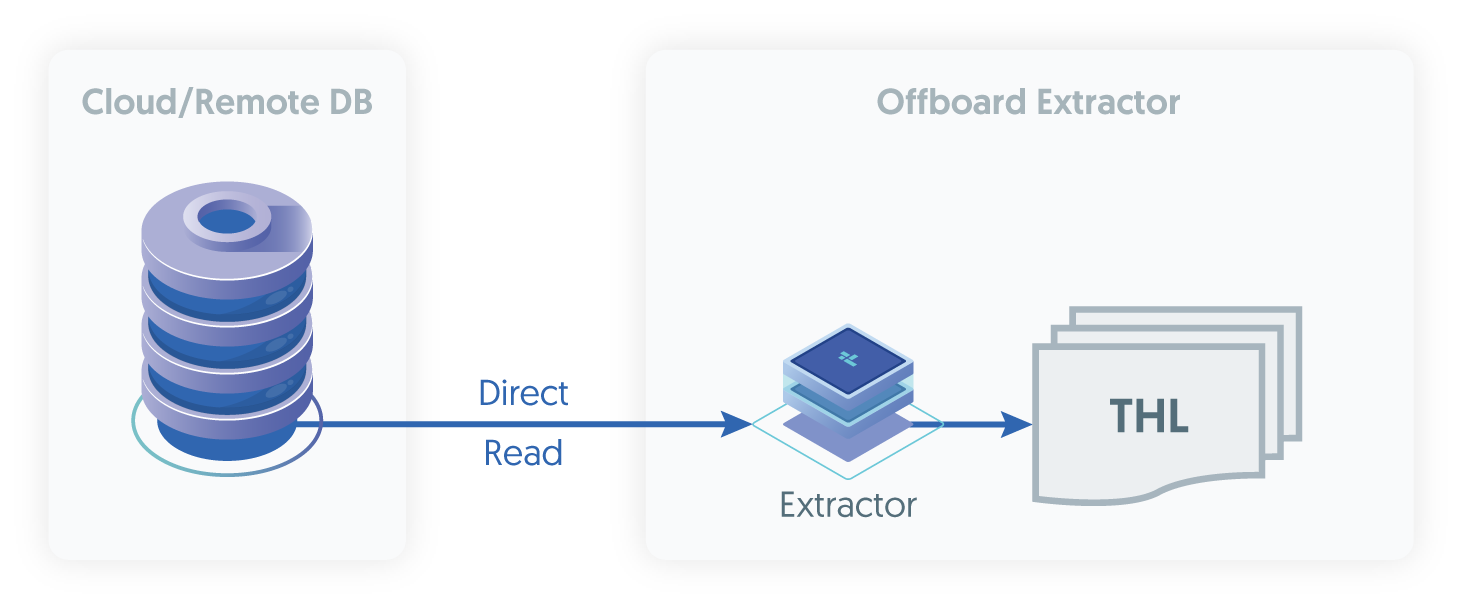
Before starting the installation, the prerequisites must have been completed (see "Installation Prerequisites") on both the Host designated for the installation of the extractor, and within the source database instance.
Install the Tungsten Replicator RPM package, or download the compressed tarball and unpack it to a staging directory:
shell> cd /opt/continuent/softwareshell> tar zxf tungsten-replicator-8.0.4-132.tar.gzChange to the Tungsten Replicator staging directory:
shell> cd tungsten-replicator-8.0.4-132Configure the replicator for extraction (In this example, the service name is alpha)
Example tungsten.ini[defaults]install-directory=/opt/continuentuser=tungstenprofile-script=~/.bash_profilemysql-allow-intensive-checks=trueskip-validation-check=InstallerMasterSlaveCheckskip-validation-check=MySQLPermissionsCheckskip-validation-check=MySQLBinaryLogsEnabledCheckskip-validation-check=MySQLMyISAMCheckskip-validation-check=RowBasedBinaryLoggingCheckrest-api-admin-user=apiuserrest-api-admin-password=secretreplicator-rest-api-address=0.0.0.0cloud-install=true[alpha]master=localhostmembers=localhostenable-heterogeneous-service=trueprivileged-master=falsereplication-host=rds.endpoint.urlreplication-port=3306replication-user=tungsten_alphareplication-password=secretdatasource-mysql-conf=/dev/nullsvc-extractor-filters=dropcatalogdataproperty=replicator.service.comments=trueShow argument definitions
install-directory=/opt/continuentInstallation directory.user=tungstenOS System User, for example tungsten. DO NOT use root.profile-script=~/.bash_profileAppend commands to include env.sh in this profile script.mysql-allow-intensive-checks=trueFor MySQL installation, enables detailed checks on the supported data types within the MySQL database to confirm compatibility.skip-validation-check=RowBasedBinaryLoggingCheckDo not run the specified validation check.skip-validation-check=RowBasedBinaryLoggingCheckDo not run the specified validation check.skip-validation-check=RowBasedBinaryLoggingCheckDo not run the specified validation check.skip-validation-check=RowBasedBinaryLoggingCheckDo not run the specified validation check.skip-validation-check=RowBasedBinaryLoggingCheckDo not run the specified validation check.rest-api-admin-user=apiuserSpecify the initial Admin Username for API access.Available from v7.0.0rest-api-admin-password=secretSpecify the initial Admin User Password for API access.rest-api-admin-passwordalias only available from version 7.1.2 onwards.Available from v7.0.0replicator-rest-api-address=0.0.0.0Address for the API to bind too.Available from v7.0.0cloud-install=trueWhen set totrue(falseby default)tpmwill skip checks for the endpoint hostname existing in the/etc/hostsfile, allowing for much smoother installations against cloud based sources or targets such as Amazon Aurora and Google Cloud SQL.Available from v8.0.0Once the prerequisites and configuring of the installation has been completed, the software can be installed:
shell> ./tools/tpm install
In the above examples,
enable-heterogeneous-service, is only required if the target applier is NOT a MySQL databasedatasource-mysql-conf, needs to be set as shown as we do not have access to themy.cnffile
If the installation process fails, check the output of the /tmp/tungsten-configure.log file for more information about the root cause.
Once the installation has been completed, you can now proceed to configure the Applier service following the relevant step within "Deploying Appliers".
Following installation of the applier, the services can be started. For information on starting and stopping Tungsten Replicator see "Starting and Stopping Tungsten Components"; configuring init scripts to startup and shutdown when the system boots and shuts down, see "Configuring Startup on Boot".
Monitoring the extractor is the same as an extractor from MySQL, for information, see "Monitoring the MySQL Extractor".