Deploying a Fan-In Topology
The fan-in topology is the logical opposite of a fan-out topology. In a fan-in topology, the data from two Sources is combined together on one Target. Fan-in topologies are often in situations where you have satellite databases, maybe for sales or retail operations, and need to combine that information together in a single database for processing.
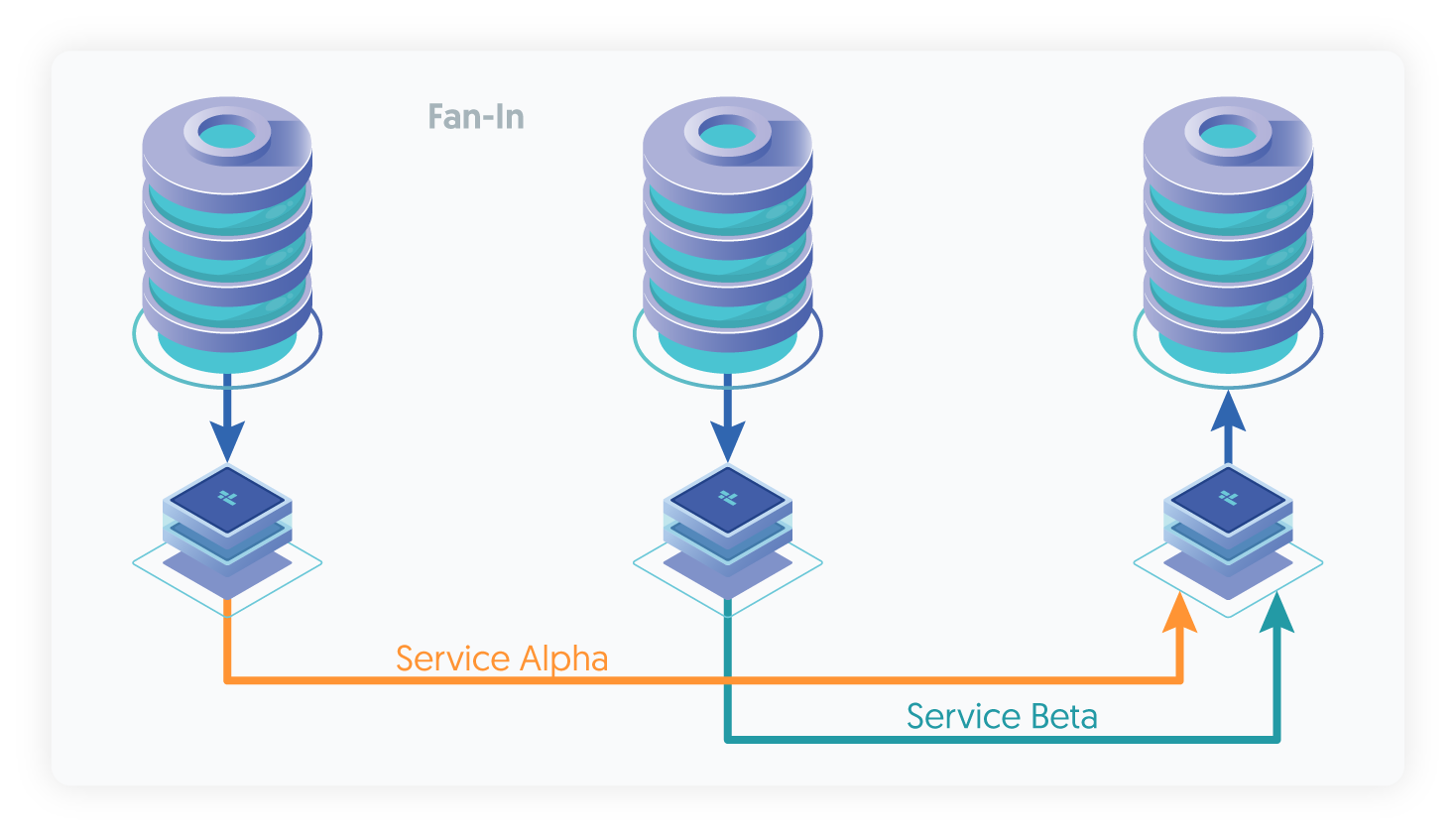
Some additional considerations need to be made when using fan-in topologies:
If the same tables from each source database are being merged together, it is possible to get collisions in the data where auto increment is used. The effects can be minimized by using increment offsets within the MySQL configuration:
auto-increment-offset = 1auto-increment-increment = 4Fan-in can work more effectively, and be less prone to problems with the corresponding data by configuring specific tables at different sites. For example, with two sites in New York and San Jose databases and tables can be prefixed with the site name, i.e.
sjc_salesandnyc_sales.Alternatively, a filter can be configured to rename the database
salesdynamically to the corresponding location based tables. See "The rename Filter" for more information.Statement-based replication will work for most instances, but where your statements are updating data dynamically within the statement, in fan-in the information may get increased according to the name of fan-in Sources. Update your configuration file to explicitly use row-based replication by adding the following to your
my.cnffile:binlog-format = rowTriggers can cause problems during fan-in replication if two different statements from each Source are replicated to the Target and cause the operations to be triggered multiple times. Tungsten Replicator cannot prevent triggers from executing on the concentrator host and there is no way to selectively disable triggers. Check at the trigger level whether you are executing on a Source or Target. For more information, see "Triggers".
To create the configuration the Extractors and services must be specified, the topology specification takes care of the actual configuration:
[epsilon]
topology=fan-in
install-directory=/opt/continuent
replication-user=tungsten
replication-password=password
master=host1,host2
members=host1,host2,host3
master-services=alpha,beta
rest-api-admin-user=apiuser
rest-api-admin-password=secret
replicator-rest-api-address=0.0.0.0
Show argument definitions
topology=fan-inReplication topology for the dataservice.install-directory=/opt/continuentInstallation directory.replication-user=tungstenUser for database connection.replication-password=passwordDatabase password.master=host1,host2Hostname of the primary (or relay) host within this service.members=host1,host2,host3Hostnames for the dataservice members.master-services=alpha,betaData service names that should be used on each primary.rest-api-admin-user=apiuserSpecify the initial Admin Username for API access.Available from v7.0.0rest-api-admin-password=secretSpecify the initial Admin User Password for API access. rest-api-admin-password alias only available from version 7.1.2 onwards.Available from v7.0.0replicator-rest-api-address=0.0.0.0Address for the API to bind too.Available from v7.0.0If the installation process fails, check the output of the /tmp/tungsten-configure.log file for more information about the root cause.
Once the installation has been completed, the service will be started and ready to use.
Management and Monitoring Fan-in Deployments
Once the service has been started, a quick view of the service status can be determined using trepctl. Because there are multiple
services, the service name and host name must be specified explicitly. The Extractor connection of one of the fan-in hosts:
shell> trepctl -service alpha -host host1 status
Processing status command...
NAME                     VALUE
----                     -----
appliedLastEventId     : mysql-bin.000012:0000000000000418;0
appliedLastSeqno       : 0
appliedLatency         : 1.194
channels               : 1
clusterName            : alpha
currentEventId         : mysql-bin.000012:0000000000000418
currentTimeMillis      : 1375451438898
dataServerHost         : host1
extensions             :
latestEpochNumber      : 0
masterConnectUri       : thl://localhost:/
masterListenUri        : thl://host1:2112/
maximumStoredSeqNo     : 0
minimumStoredSeqNo     : 0
offlineRequests        : NONE
pendingError           : NONE
pendingErrorCode       : NONE
pendingErrorEventId    : NONE
pendingErrorSeqno      : -1
pendingExceptionMessage: NONE
pipelineSource         : jdbc:mysql:thin://host1:13306/
relativeLatency        : 6232.897
resourcePrecedence     : 99
rmiPort                : 10000
role                   : master
seqnoType              : java.lang.Long
serviceName            : alpha
serviceType            : local
simpleServiceName      : alpha
siteName               : default
sourceId               : host1
state                  : ONLINE
timeInStateSeconds     : 6231.881
transitioningTo        :
uptimeSeconds          : 6238.061
version                : Tungsten Replicator 8.0.4 Build 132
Finished status command...
The corresponding Extractor service from the other host is beta on host2:
shell> trepctl -service beta -host host2 status
Processing status command...
NAME                     VALUE
----                     -----
appliedLastEventId     : mysql-bin.000012:0000000000000415;0
appliedLastSeqno       : 0
appliedLatency         : 0.941
channels               : 1
clusterName            : beta
currentEventId         : mysql-bin.000012:0000000000000415
currentTimeMillis      : 1375451493579
dataServerHost         : host2
extensions             :
latestEpochNumber      : 0
masterConnectUri       : thl://localhost:/
masterListenUri        : thl://host2:2112/
maximumStoredSeqNo     : 0
minimumStoredSeqNo     : 0
offlineRequests        : NONE
pendingError           : NONE
pendingErrorCode       : NONE
pendingErrorEventId    : NONE
pendingErrorSeqno      : -1
pendingExceptionMessage: NONE
pipelineSource         : jdbc:mysql:thin://host2:13306/
relativeLatency        : 6286.579
resourcePrecedence     : 99
rmiPort                : 10000
role                   : master
seqnoType              : java.lang.Long
serviceName            : beta
serviceType            : local
simpleServiceName      : beta
siteName               : default
sourceId               : host2
state                  : ONLINE
timeInStateSeconds     : 6285.823
transitioningTo        :
uptimeSeconds          : 6291.053
version                : Tungsten Replicator 8.0.4 Build 132
Finished status command...
Note that because this is a fan-in topology, the sequence numbers and applied sequence numbers will be different for each service, as each service is independently storing data within the fan-in hub database.
The following sequence number combinations should match between the different hosts on each service:
| Extractor Service | Source Host | Target Host |
|---|---|---|
alpha | host1 | host3 |
beta | host1 | host3 |
The sequence numbers between host1 and host2 will not match, as they are two independent services.