The Front Page
Once logged in, you are presented with the following view:
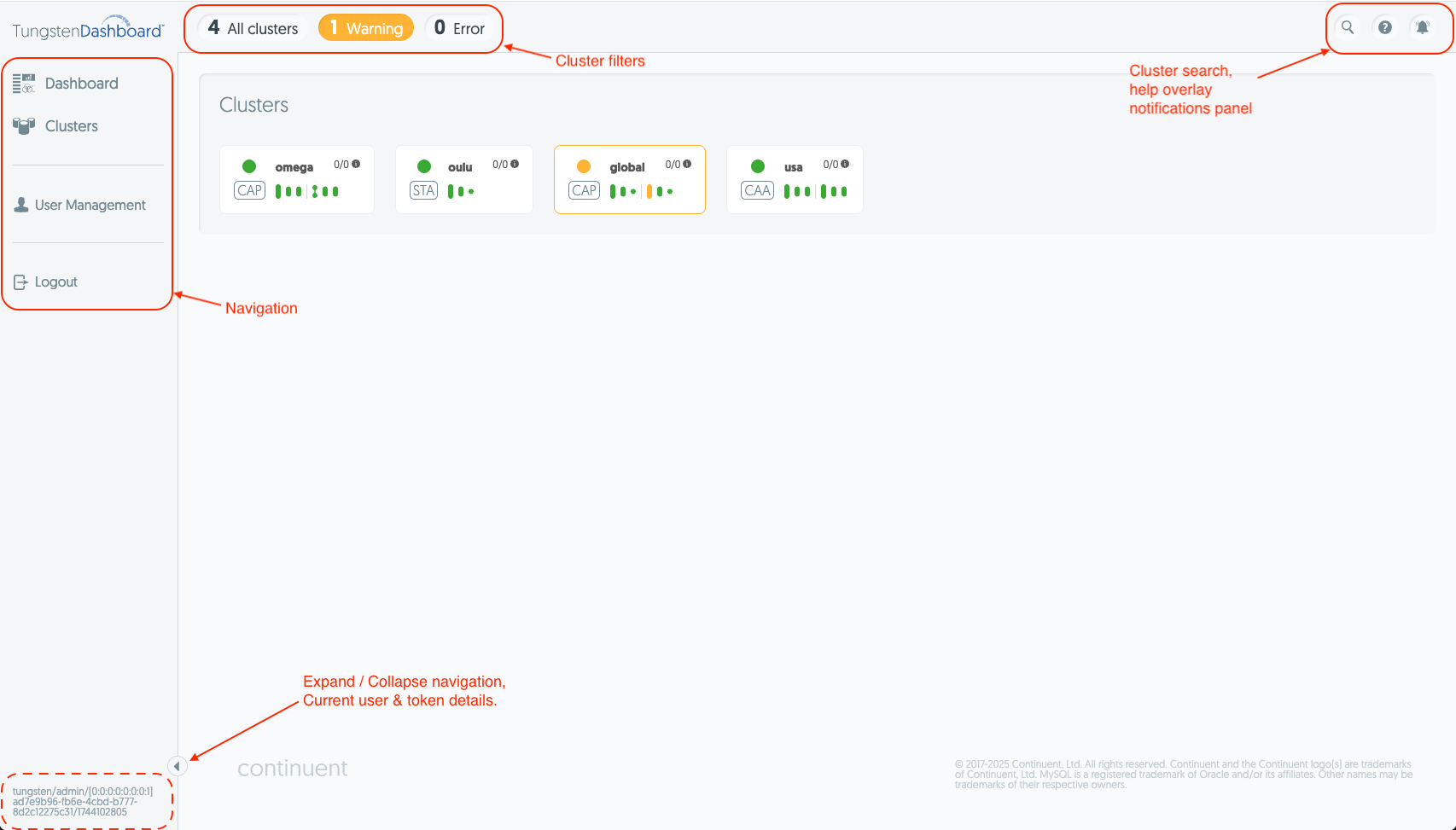
An explanation of each highlighted area is as follows:
Navigation
On the left you can see the primary navigation. Hover over it to expand it, and use the button at the bottom of the side bar to lock it in place.
- Dashboard page is the first page opened
- Clusters page is the main monitoring page and page that allows for cluster operations.
- User management allows you to see, create and delete users.
- At the bottom of the navigation you can see the toggle button and current user details.
Cluster Filters
At the top you have the cluster filters. Clicking any of them will take you to the Clusters page and show you the clusters that are reporting the filtered status.
Search & Notifications
On the far right of the top bar you have:
- Search - takes you to the Clusters page while filtering services by their name based on your input.
- Help - this opens an overlay that shows details about elements on the page. Hovering over any element will display more details about it.
- Notification - clicking this will open the notification messages sidebar on the right.