tpm report
Available in 7.0.1 and later.
The purpose of tpm report is to provide easy access to all of the settings that pertain to a specific topic.
tpm report [args]
Arguments:
| Option | Description | Version |
|---|---|---|
--api | Use the v2 API REST interface instead of the command line when possible | |
--debugAliases: -d | Debug mode. | |
--extraAliases: -x | Display the copy command executed. | 7.1.0 |
--helpAliases: -h | ||
--infoAliases: -i | ||
--json | Display report as JSON, all other output will be suppressed. | |
--listAliases: -l | List reports by number | |
--passwordAliases: -p | Use to specify the API auth password (default: not defined) | |
--path | Use to supply full path to replicator executables. | |
--ports | When available, display the hostname and listener ports. | |
--quietAliases: -q | ||
--report | Limit display to the specified report number(s); Use a comma-separated numeric list with no spaces to specify multiple reports | |
--sslAliases: --security | Display current security settings and values (default behavior when no topic is specified) | |
--testAliases: -t | ||
--thl | Use to supply full path to thl executable (Ignores --path) | |
--trepctl | Use to supply full path to trepctl executable (Ignores --path) | |
--userAliases: -u | Use to specify API auth User (default: not defined) | |
--verboseAliases: -v | Verbose Output. |
The default (and only) topic is the security stance. More topics will be added over time.
The examples below are taken from a host running Tungsten Cluster, showing the full scope of the tpm report command.
For standalone Tungsten Replicator installations, the results will pertain purely to the Replicator component.
Each topic contains a set of numbered reports. View the list of reports for any topic using --list (or
-l). For example:
shell> tpm report --list
>>> Security Reports <<<

1. Application to Connector (mysql)
Communications from the client application to the Connector port

2. Connector to Database (mysql)
Communications from the Connector to the Database port

3. Connector to Manager (proprietary (routerGateway))
Communications from the Connector to the Manager

4. Manager to Manager (rmi/jmx, jgroups)
Communications from Manager to Manager

5. Manager to Database (mysql)
Communications from Manager to Database

6. Manager to Replicator (rmi/jmx)
Communications from Manager to Replicator

7. Replicator to Replicator (thl)
Communications from Replicator to Replicator

8. Replicator to Database (mysql)
Communications from Replicator to Database

9. connector Command to the Connector (rmi/jmx)
Communications from the connector cli command to the to local Connector process

10. cctrl Command to the Manager (rmi/jmx)
Communications from the cctrl cli command to the to Manager process

11. trepctl Command to the Replicator (rmi/jmx)
Communications from the trepctl cli command to the to Replicator process

12. Replicator On Disk THL (proprietary (thl encryption))
THL files on disk are encrypted

13. SSL-Specific `tpm` Options for the API (http,https)
Options used by tpm to enable or disable the API for each component
The following graphic provides a visual representation to the various communication channels within Tungsten Cluster and how they are mapped to the various "levels" presented above.
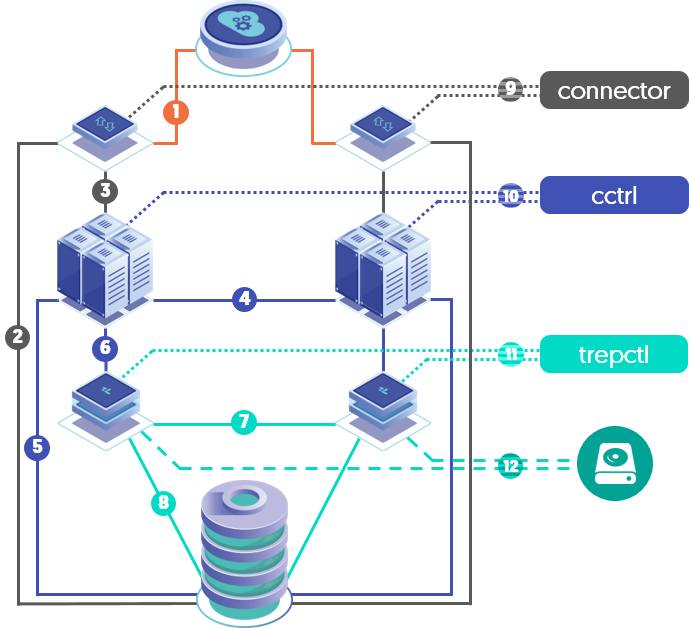
To display just a specific report, specify it using the --report option. For example:
shell> tpm report --report 1

TUNGSTEN SECURITY REPORT as of Thu May  5 20:37:17 UTC 2022

---------------------------------------------------------------------------
>> Comm Channel 1:  Application to Connector <<
---------------------------------------------------------------------------

=> CHANNEL INFORMATION:
Connector Bridge Mode: OFF
Application-to-Connector SSL is Enabled

=> TPM OPTIONS:
connector-ssl-capable = true
enable-connector-client-ssl = true
enable-connector-ssl = true
To display additional information in the report, use the --extra (or -x) option. For example:
shell> tpm report --extra --report 1

TUNGSTEN SECURITY REPORT as of Thu May  5 20:37:17 UTC 2022

---------------------------------------------------------------------------
>> Comm Channel 1:  Application to Connector <<
---------------------------------------------------------------------------

=> CHANNEL INFORMATION:
Connector Bridge Mode: OFF
Application-to-Connector SSL is Enabled (SSL.IN=true, Proxy Mode)

=> TPM OPTIONS:
connector-ssl-capable = true
enable-connector-client-ssl = true
enable-connector-ssl = true
To attempt to gather the information via the API, use --api on the command line. The tpm report command
will fall back to the CLI tools if an API method is unavailable for a given report. For example:
shell> tpm report -x --report 1 --api

TUNGSTEN SECURITY REPORT as of Thu May  5 20:43:28 UTC 2022

---------------------------------------------------------------------------
>> Comm Channel 1:  Application to Connector <<
---------------------------------------------------------------------------

=> CHANNEL INFORMATION:
APIv2 Connector is SSL Capable: true
APIv2 Connector Requires SSL: true
APIv2 Connector Bridge Mode: false
WARN: No APIv2 solution available for Channel 1: Application to Connector - falling back to CLI
Application-to-Connector SSL is Enabled (SSL.IN=true, Proxy Mode)

=> TPM OPTIONS:
connector-ssl-capable = true
enable-connector-client-ssl = true
enable-connector-ssl = true
You may need to specify FILENAME--user and FILENAME--password for API authentication if not
configured via your &definifile; at installation time.
If both FILENAME--user and --password are defined, tpm report will use them.
If either or both --user and --password are missing, tpm report will attempt
to derive the values from the configuration.
If you wish to output the report in machine-readable JSON-formatted text with other output suppressed, simply add the
--json option. For example:
shell> tpm report -x --report 1 --api --json
{
 "1" : {
    "channelinformation" : [
       "APIv2 Connector is SSL Capable: true",
       "APIv2 Connector Requires SSL: true",
       "APIv2 Connector Bridge Mode: false",
       "WARN: No APIv2 solution available for Channel 1: Application to Connector - falling back to CLI",
       "Application-to-Connector SSL is Enabled (SSL.IN=true, Proxy Mode)"
    ],
    "metadata" : {
       "description" : "Communications from the client application to the Connector port",
       "protocol" : "mysql",
       "section" : "Application to Connector",
       "sslCapable" : 1
    },
    "tpmoptions" : {
       "connector-ssl-capable" : "true",
       "enable-connector-client-ssl" : "true",
       "enable-connector-ssl" : "true"
    }
 }
}
To simply display all reports, use:
shell> tpm report
shell> tpm report -x
shell> tpm report --json
shell> tpm report -x --json