Migrating and Seeding Data
Migrating from MySQL Native Replication 'In-Place'
If you are migrating an existing MySQL native replication deployment to use Tungsten Cluster the configuration of the Tungsten Cluster replication must be updated to match the status of the replica.
Deploy Tungsten Cluster using the model or system appropriate according to "deployment". Ensure that the Tungsten Cluster is not started automatically by excluding the
startorstart-and-reportoptions from the configuration.On each replica
Confirm that native replication is working on all replica nodes :
MySQL 8.4+
shell> echo 'SHOW REPLICA STATUS\G' | tpm mysql | \egrep 'Source_Host| Last_Error| Replica_SQL_Running'Source_Host: tr-ssl1Replica_SQL_Running: YesLast_Error:Upto MySQL 8.0
shell> echo 'SHOW SLAVE STATUS\G' | tpm mysql | \egrep 'Master_Host| Last_Error| Slave_SQL_Running'Master_Host: tr-ssl1Slave_SQL_Running: YesLast_Error:On the primary and each replica
Reset the Tungsten Replicator position on all servers :
shell> replicator start offlineshell> trepctl -service alpha reset -all -yOn the primary
Login and start Tungsten Cluster services and put the Tungsten Replicator online:
shell> startallshell> trepctl onlineOn the primary
Put the cluster into MAINTENANCE mode using
cctrlto prevent Tungsten Cluster automatically reconfiguring services:cctrl> set policy maintenanceOn each replica
MySQL 8.4+
Record the current replica log position (as reported by the
Relay_Source_Log_FileandExec_Source_Log_Posoutput fromSHOW REPLICA STATUS. Ideally, each replica should be stopped at the same position:shell> echo 'SHOW REPLICA STATUS\G' | tpm mysql | \egrep 'Source_Host| Last_Error| Relay_Source_Log_File| Exec_Source_Log_Pos'Source_Host: tr-ssl1Relay_Source_Log_File: mysql-bin.000025Last_Error: Error executing row event: 'Table 'tungsten_alpha.heartbeat' doesn't exist'Exec_Source_Log_Pos: 181268Upto MySQL 8.0
Record the current replica log position (as reported by the
Relay_Master_Log_FileandExec_Master_Log_Posoutput fromSHOW SLAVE STATUS. Ideally, each replica should be stopped at the same position:shell> echo 'SHOW SLAVE STATUS\G' | tpm mysql | \egrep 'Master_Host| Last_Error| Relay_Master_Log_File| Exec_Master_Log_Pos'Master_Host: tr-ssl1Relay_Master_Log_File: mysql-bin.000025Last_Error: Error executing row event: 'Table 'tungsten_alpha.heartbeat' doesn't exist'Exec_Master_Log_Pos: 181268If you have multiple replicas configured to read from this primary, record the replica position individually for each host. Once you have the information for all the hosts, determine the earliest log file and log position across all the replicas, as this information will be needed when starting Tungsten Cluster replication. If one of the servers does not show an error, it may be replicating from an intermediate server. If so, you can proceed normally and assume this server stopped at the same position as the host is replicating from.
On the primary
Take the replicator offline and clear the THL:
shell> trepctl offlineshell> trepctl -service alpha reset -all -yOn the primary
Start replication, using the lowest binary log file and log position from the replica information determined in step 6.
shell> trepctl online -from-event 000025:181268Tungsten Replicator will start reading the MySQL binary log from this position, creating the corresponding THL event data.
On each replica
Disable native replication to prevent native replication being accidentally started on the replica.
MySQL 8.4+
shell> echo "STOP REPLICA; RESET REPLICA ALL;" | tpm mysqlUpto MySQL 8.0
shell> echo "STOP SLAVE; RESET SLAVE ALL;" | tpm mysqlIf the final position of MySQL replication matches the lowest across all replicas, start Tungsten Cluster services:
shell> trepctl onlineshell> startallThe replica will start reading from the binary log position configured on the primary.
If the position on this replica is different, use
trepctl online -from-eventto set the online position according to the recorded position when native MySQL was disabled. Then start all remaining services withstartall.shell> trepctl online -from-event 000025:188249shell> startall
Check that replication is operating correctly by using
trepctl reseton the primary and each replica to confirm the correct position, or usecctrl.Put the cluster back into AUTOMATIC mode:
cctrl> set policy automaticUpdate your applications to use the installed connector services rather than a direct connection.
Remove the
master.infofile on each replica to ensure that when a replica restarts, it does not connect up to the primary MySQL server again.
Once these steps have been completed, Tungsten Cluster should be operating as the replication service for your MySQL servers. Use the information in "operations" to monitor and administer the service.
Migrating from MySQL Native Replication Using a New Service
When running an existing MySQL native replication service that needs to be migrated to a Tungsten Cluster service, one solution is to create the new Tungsten Cluster service, synchronize the content, and then install a service that migrates data from the existing native service to the new service while applications are reconfigured to use the new service. The two can then be executed in parallel until applications have been migrated.
The basic structure is shown below.
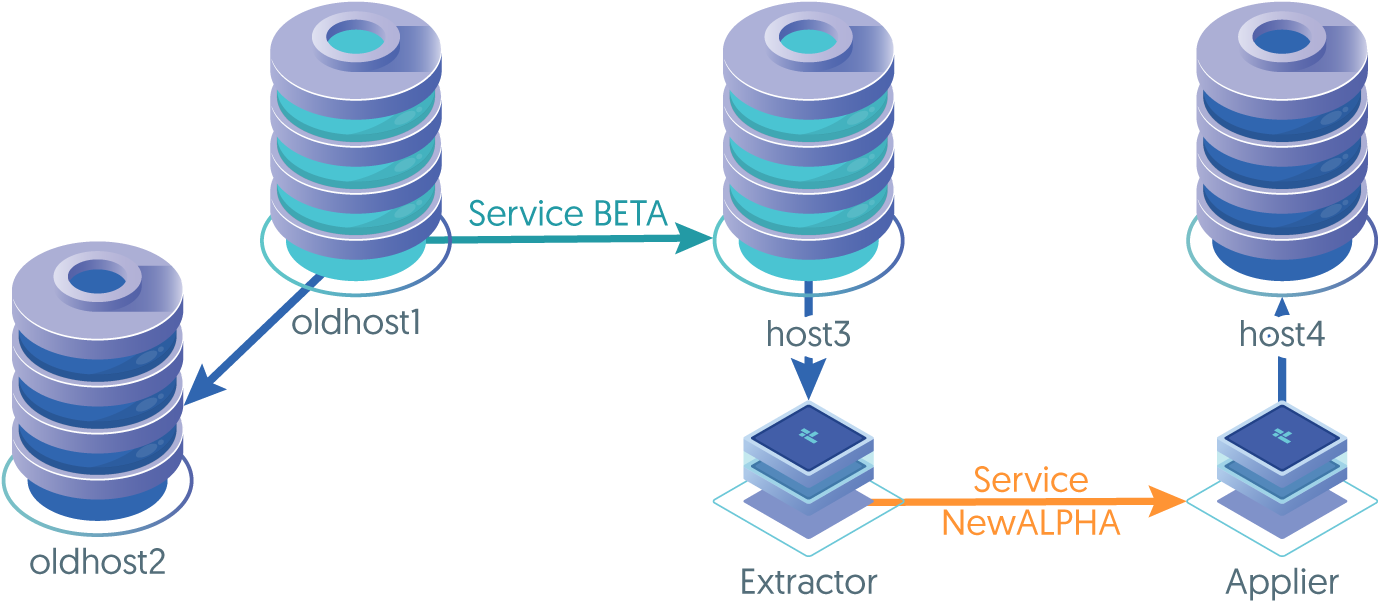
The migration consists of two steps:
- Initializing the new service with the current database state.
- Creating a Tungsten Replicator deployment that continues to replicate data from the native MySQL service to the new service.
Once the application has been switched and is executing against the new service, the secondary replication can be disabled by shutting
down the Tungsten Replicator in
To configure the service:
Stop replication on a replica for the existing native replication installation :
MySQL 8.4+
mysql> STOP REPLICA;Obtain the current replica position within the primary binary log :
mysql> SHOW REPLICA STATUS\G...Source_Host: host3Relay_Source_Log_File: mysql-bin.000002Exec_Source_Log_Pos: 559...Upto MySQL 8.0
mysql> STOP SLAVE;Obtain the current replica position within the primary binary log :
mysql> SHOW SLAVE STATUS\G...Master_Host: host3Relay_Master_Log_File: mysql-bin.000002Exec_Master_Log_Pos: 559...Create a backup using any method that provides a consistent snapshot. The MySQL primary may be used if you do not have a replica to backup from. Be sure to get the binary log position as part of your backup. This is included in the output to
xtrabackupor using the--master-data=2option withmysqldump.Restart the replica using native replication :
MySQL 8.4+
mysql> START REPLICA;Upto MySQL 8.0
mysql> START SLAVE;On the primary and each replica within the new service, restore the backup data and start the database service
Setup the new Tungsten Cluster deployment using the MySQL servers on which the data has been restored. For clarity, this will be called
newalpha.Configure a second replication service,
betato apply data using the existing MySQL native replication server as the primary, and the primary ofnewalpha. The information provided in "deployment-replicatorin" will help.Start the replicator in an offline state:
shell> replicator start offlineSet the replication position for
betato the point within the binary logs where the backup was taken:shell> trepctl online -from-event 000002:559
Once replication has been started, use trepctl to check the status and ensure that replication is operating correctly.
The original native MySQL replication primary can continue to be used for reading and writing from within your application, and changes will
be replicated into the new service on the new hardware. Once the applications have been updated to use the new service, the old servers can be
decommissioned and replicator service beta stopped and removed.
Seeding Data through MySQL
Once the Tungsten Replicator is installed, it can be used to provision all replicas with the primary data. The replicas will need enough information in order for the installation to succeed and for Tungsten Replicator to start. The provisioning process requires dumping all data on the primary and reloading it back into the primary server. This will create a full set of THL entries for the replica replicators to apply. There may be no other applications accessing the primary server while this process is running. Every table will be emptied out and repopulated so other applications would get an inconsistent view of the database. If the primary is a MySQL replica, then the replica process may be stopped and started to prevent any changes without affecting other servers.
If you are using a MySQL replica as the primary, stop the replication thread :
MySQL 8.4+
mysql> STOP REPLICA;Upto MySQL 8.0
mysql> STOP SLAVE;Check Tungsten Replicator status on all servers to make sure it is
ONLINEand that theappliedLastSeqnovalues are matching :shell> trepctl statusStarting the process before all servers are consistent could cause inconsistencies. If you are trying to completely reprovision the server then you may consider running
trepctl restorebefore proceeding. That will reset the replication position and ignore any previous events on the primary.Use
mysqldumpto output all of the schemas that need to be provisioned :shell> mysqldump --opt --skip-extended-insert -hhost3 -utungsten -P13306 -p \--databases db1,db2 > ~/dump.sqlOptionally, you can just dump a set of tables to be provisioned :
shell> mysqldump --opt --skip-extended-insert -hhost3 -utungsten -P13306 -p \db1 table1 table2 > ~/dump.sqlIf you are using heterogeneous replication all tables on the replica must be empty before proceeding. The Tungsten Replicator does not replicate DDL statements such as
DROP TABLEandCREATE TABLE. You may either truncate the tables on the replica or useddlscanto recreate them.Load the dump file back into the primary to recreate all data :
shell> cat ~/dump.sql | tpm mysqlThe Tungsten Replicator will read the binary log as the dump file is loaded into MySQL. The replicas will automatically apply these statements through normal replication.
If you are using a MySQL replica as the primary, restart the replication thread after the dump file has completed loading :
MySQL 8.4+
mysql> START REPLICA;Upto MySQL 8.0
mysql> START SLAVE;Monitor replication status on the primary and replicas :
shell> trepctl status