Replicating Data Into an Existing Dataservice
Using a replicator that writes data into an existing data service can be used when migrating from an existing service into a new service.
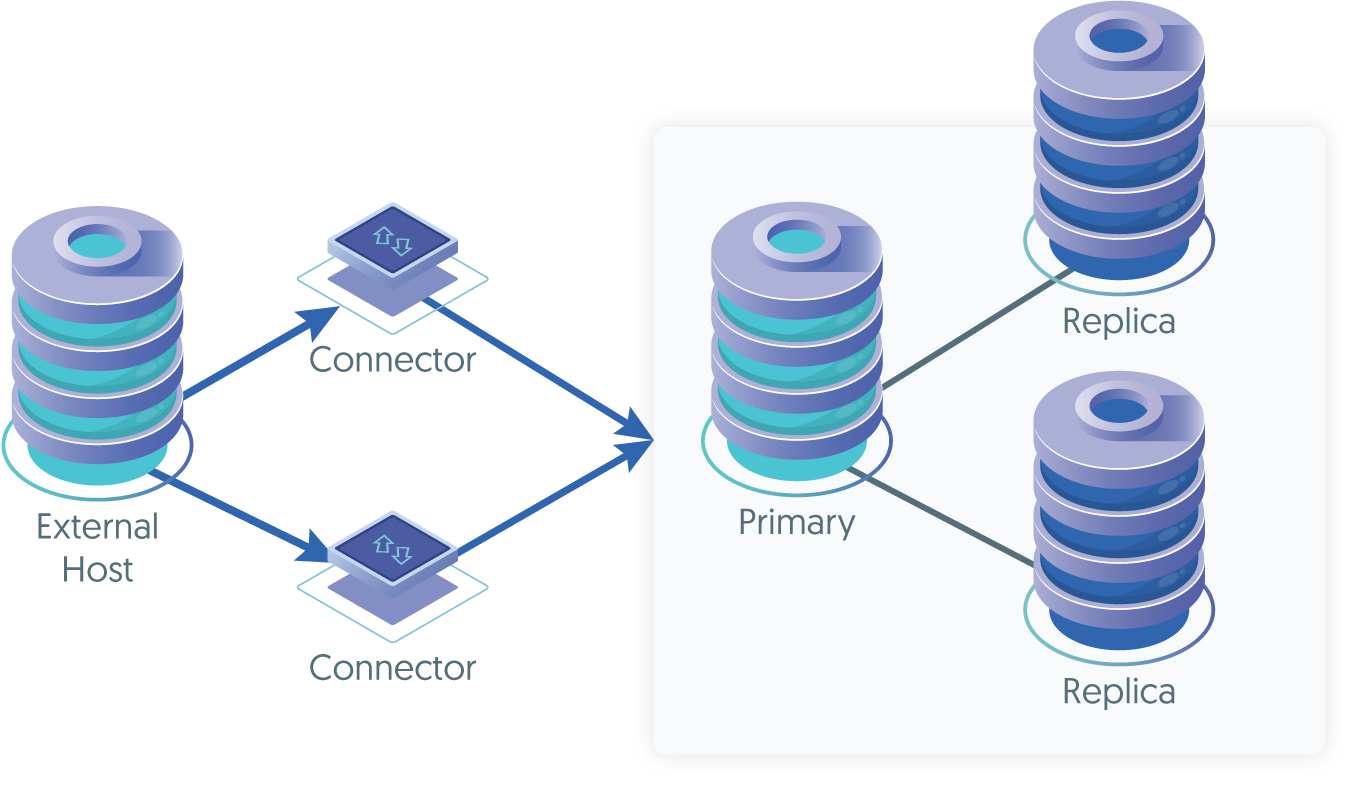
In order to configure this deployment, there is just one simpe step:
- Create a new replicator on the source server that extracts the data from the binary logs, and applies to the target cluster using a
special
directtopology.
There are also the following requirements:
- If Tungsten Cluster™ is in use on the target, then you must use the same version of Tungsten Replicator™ that matches the version runnning in the Cluster.
- Hosts on both the replicator and cluster must be able to communicate with each other.
- The replication user on the source host must have the
RELOAD,REPLICATION SLAVE, andREPLICATION CLIENTprivileges. - Replicator must be able to connect as the
tungstenuser to the databases within the cluster. - When writing into the primary through the connector, the user must be given the correct privileges to write and update the MySQL server.
For this reason, the easiest method is to use the
tungstenuser, and ensure that that user has been added to theuser.map:tungsten secret alpha
Install the Tungsten Replicator™ package by downloading the compressed tarball and unpack it on
host1:
shell> cd /opt/continuent/software
shell> tar zxf tungsten-replicator-8.0.4-132.tar.gz
Change to the Tungsten Replicator staging directory:
shell> cd tungsten-replicator-8.0.4-132
Configure the replicator on host1
Create the /etc/tungsten/tungsten.ini using the example below as a template. Once created to suit your needs, run tpm to
perform the installation.
[defaults]
install-directory=/opt/continuent
user=tungsten
skip-validation-check=MySQLNoMySQLReplicationCheck
rest-api-admin-user=apiuser
rest-api-admin-password=secret
replicator-rest-api-address=0.0.0.0
log-slave-updates=true

[beta]
topology=direct
master=host1
direct-datasource-host=host1
direct-replication-port=3306
replication-host=connectorhost1
replication-user=tungsten
replication-password=secret
replication-port=3306
Show argument definitions
install-directory=/opt/continuentInstallation directory.user=tungstenOS System User, for example tungsten. DO NOT use root.skip-validation-check=MySQLNoMySQLReplicationCheckDo not run the specified validation check.rest-api-admin-user=apiuserSpecify the initial Admin Username for API access.Available from v7.0.0rest-api-admin-password=secretSpecify the initial Admin User Password for API access. rest-api-admin-password alias only available from version 7.1.2 onwards.Available from v7.0.0replicator-rest-api-address=0.0.0.0Address for the API to bind too.Available from v7.0.0log-slave-updates=trueWhen enabled, transactions written to a replica will be logged to the replicas binary logs.This creates a configuration that specifies that the topology should read directly from the source host, host1,
writing directly to connectorhost1.
This assumes the replicator is being installed on the source host, host1.
Now install the service using tpm:
shell> ./tools/tpm install
If the installation process fails, check the output of the /tmp/tungsten-configure.log file for more information
about the root cause.
Once the installation has been completed, you can start the replicator as follows:
shell> replicator start
By default the replicator will start from the current binlog position. If you need to start from a different position, you can do this as follows:
shell> replicator start offline
Next, using the binary log and position you want to start from, you can position the replicators starting position. For example, you have d
etermined that the starting point is binary log file mysql-bin.000011 and position 758, then using the index of
the filename and position, execute the following command:
shell> trepctl online -from-event 000011:758
You can now monitor replication using the status command:
shell> trepctl status

Processing status command...
NAME                     VALUE
----                     -----
appliedLastEventId     : mysql-bin.000011:0000000000003988;156
appliedLastGoodLatency : 171.866
appliedLastGoodSeqno   : 8
appliedLastSeqno       : 8
appliedLatency         : 171.866
autoRecoveryEnabled    : false
autoRecoveryTotal      : 0
channels               : 1
clusterName            : beta
currentEventId         : mysql-bin.000012:0000000000000157
currentTimeMillis      : 1737546857700
dataServerHost         : connectorhost1
extensions             :
host                   : host1
latestEpochNumber      : 0
masterConnectUri       : null
masterListenUri        : null
maximumStoredSeqNo     : 8
minimumStoredSeqNo     : 0
offlineRequests        : NONE
pendingError           : NONE
pendingErrorCode       : NONE
pendingErrorEventId    : NONE
pendingErrorSeqno      : -1
pendingExceptionMessage: NONE
pipelineSource         : jdbc:mysql:thin://host1:13306/
relativeLatency        : 378.7
resourceJdbcDriver     : org.drizzle.jdbc.DrizzleDriver
resourceJdbcUrl        : jdbc:mysql:thin://connectorhost1:3306/${DBNAME}?jdbcCompliantTruncation=false&zeroDateTimeBehavior=convertToNull&tinyInt1isBit=false&allowMultiQueries=true&yearIsDateType=false
resourceVendor         : mysql
rmiPort                : 10002
role                   : direct
seqnoType              : java.lang.Long
serviceName            : beta
serviceType            : local
simpleServiceName      : beta
siteName               : default
sourceId               : host1
state                  : ONLINE
timeInStateSeconds     : 208.04
timezone               : GMT
transitioningTo        :
uptimeSeconds          : 333.742
useSSLConnection       : false
version                : Tungsten Replicator 8.0.4 Build 132
Finished status command...