Deploying a Multi-Site Active/Active (MSAA) Cluster
The procedures in this section are designed for the Multi-Site/Active-Active topology ONLY. Do NOT use these procedures for Composite Active/Active Clustering.
Please refer to "Deploying a Composite Active/Active (CAA) Cluster" for more information on this topology.
A Multi-Site/Active-Active topology provides all the benefits of a typical dataservice at a single location, but with the benefit of also replicating the information to another site. The underlying configuration within Tungsten Cluster uses the Tungsten Replicator which enables operation between the two sites.
The configuration is in two separate parts:
- Tungsten Cluster dataservice that operates the main dataservice service within each site.
- Tungsten Replicator dataservice that provides replication between the two sites; one to replicate from site1 to site2, and one for site2 to site1.
A sample display of how this operates is provided shown below.
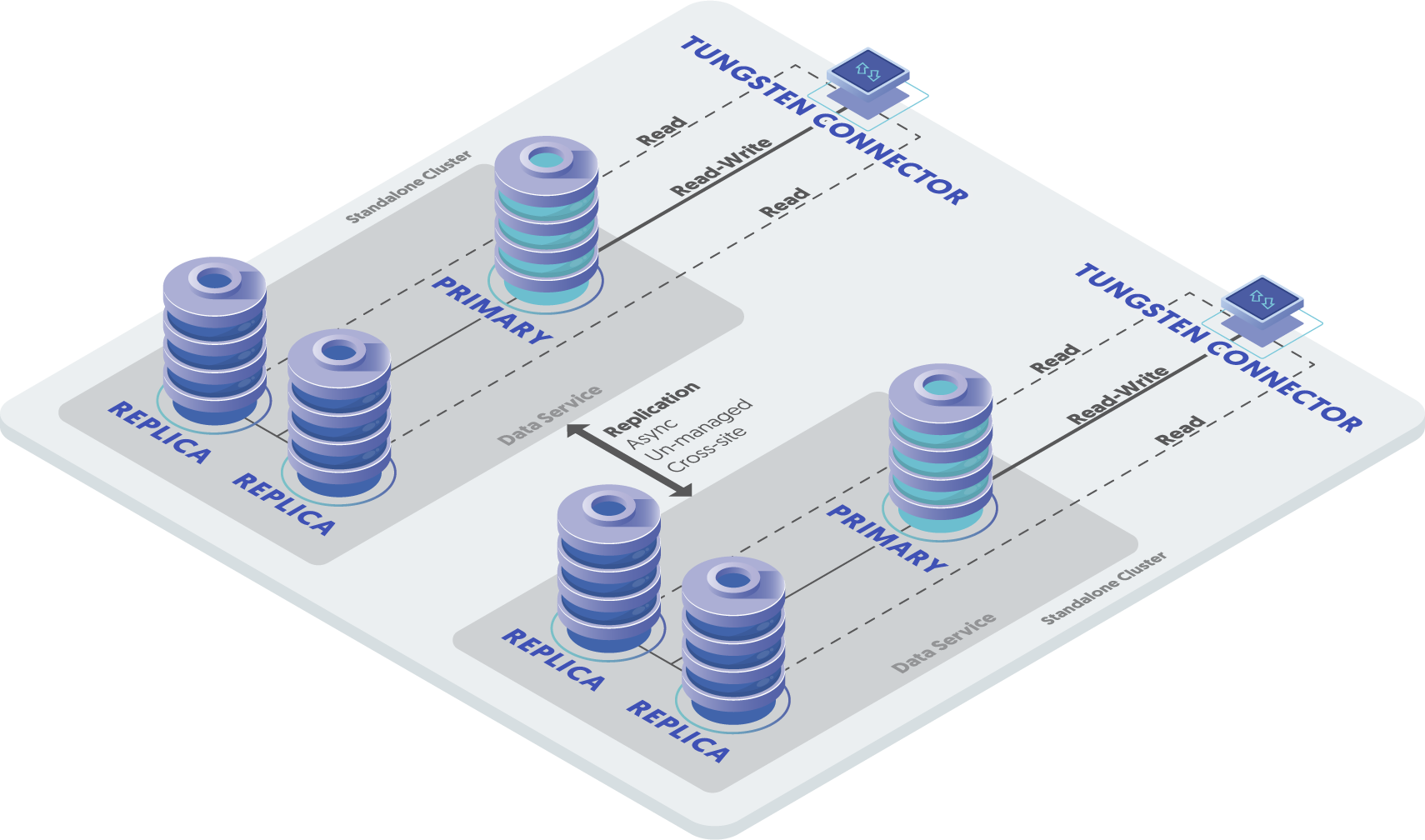
Using an example of two clusters called east and west, each containing three database nodes,
the service can be described as follows:
Tungsten Cluster Service: east
Replicates data between
east1,east2, andeast3.Tungsten Cluster Service: west
Replicates data between
westdb1,westdb2, andwestdb3.Tungsten Replicator Service: east
Defines the replication of data within east as a replicator service using Tungsten Replicator. This service reads from all the hosts within the Tungsten Cluster service
eastand writes towestdb1,westdb2, andwestdb3. The service name is the same to ensure that we do not duplicate writes from the clustered service already running.Data is read from the
eastTungsten Cluster and replicated to thewestTungsten Cluster dataservice. The configuration allows for changes in the Tungsten Cluster dataservice (such as a switch or failover) without upsetting the site-to-site replication.Tungsten Replicator Service: west
Defines the replication of data within west as a replicator service using Tungsten Replicator. This service reads from all the hosts within the Tungsten Cluster service
westand writes toeast1,east2, andeast3. The service name is the same to ensure that we do not duplicate writes from the clustered service already running.Data is read from the
westTungsten Cluster and replicated to theeastTungsten Cluster dataservice. The configuration allows for changes in the Tungsten Cluster dataservice (such as a switch or failover) without upsetting the site-to-site replication.Tungsten Replicator Service: east_west
Replicates data from
easttowest, using Tungsten Replicator. This is a service alias that defines the reading from the dataservice (as an extractor) to other servers within the destination cluster.Tungsten Replicator Service: west_east
Replicates data from
westtoeast, using Tungsten Replicator. This is a service alias that defines the reading from the dataservice (as an extractor) to other servers within the destination cluster.
Although this topology is valid and can be installed with any version of tungsten, it is strongly advised that Composite Active/Active be used in favour of version 6.x or later as this provide additional benefits, especially at the connector layer.
Prepare
Some considerations must be taken into account for any active/active scenario:
For tables that use auto-increment, collisions are possible if two hosts select the same auto-increment number. You can reduce the effects by configuring each MySQL host with a different auto-increment settings, changing the offset and the increment values. For example, adding the following lines to your
my.cnffile:auto-increment-offset = 1auto-increment-increment = 4In this way, the increments can be staggered on each machine and collisions are unlikely to occur.
Use row-based replication. Update your configuration file to explicitly use row-based replication by adding the following to your
my.cnffile:binlog-format = rowBeware of triggers. Triggers can cause problems during replication because if they are applied on the replica as well as the primary you can get data corruption and invalid data. Tungsten Cluster cannot prevent triggers from executing on a replica, and in an active/active topology there is no sensible way to disable triggers. Instead, check at the trigger level whether you are executing on a primary or replica. For more information, see "Triggers".
Install
Creating the configuration requires two distinct steps, the first to create the two Tungsten Cluster deployments, and a second that creates the Tungsten Replicator configurations on different network ports, and different install directories.
Download and extract the Tungsten Cluster and Tungsten Replicator :
shell> cd /opt/continuent/softwareshell> tar zxf tungsten-clustering-8.0.4-132.tar.gzshell> tar zxf tungsten-replicator-8.0.4-132.tar.gzChange to the Tungsten Cluster directory:
shell> cd tungsten-clustering-8.0.4-132Create the
/etc/tungsten/tungsten.iniusing the example below as a template. Once created to suit your needs, run thetpmto perform the installation.Example tungsten.ini[defaults]user=tungsteninstall-directory=/opt/continuentreplication-user=tungstenreplication-password=secretreplication-port=13306profile-script=~/.bashrcapplication-user=app_userapplication-password=secretapplication-port=3306skip-validation-check=MySQLPermissionsCheckrest-api-admin-user=apiuserrest-api-admin-password=secretconnector-rest-api-address=0.0.0.0manager-rest-api-address=0.0.0.0replicator-rest-api-address=0.0.0.0[defaults.replicator]home-directory=/opt/replicatorthl-port=2113rmi-port=10002executable-prefix=mmreplicator-rest-api-port=28097property=replicator.prometheus.exporter.port=28091[east]topology=clusteredconnectors=east1,east2,east3master=east1members=east1,east2,east3[west]topology=clusteredconnectors=west1,west2,west3master=west1members=west1,west2,west3[east_west]topology=cluster-slavemaster-dataservice=eastslave-dataservice=west[west_east]topology=cluster-slavemaster-dataservice=westslave-dataservice=eastShow argument definitions
user=tungstenOS System User, for example tungsten. DO NOT use root.install-directory=/opt/continuentInstallation directory.replication-user=tungstenUser for database connection.replication-password=secretDatabase password.replication-port=13306Database network port.profile-script=~/.bashrcAppend commands to include env.sh in this profile script.application-user=app_userDatabase username for the connector.application-password=secretDatabase password for the connector.application-port=3306Port for the connector to listen on.skip-validation-check=MySQLPermissionsCheckDo not run the specified validation check.rest-api-admin-user=apiuserSpecify the initial Admin Username for API access.Available from v7.0.0rest-api-admin-password=secretSpecify the initial Admin User Password for API access.rest-api-admin-passwordalias only available from version 7.1.2 onwards.Available from v7.0.0connector-rest-api-address=0.0.0.0Address for the API to bind too.Available from v7.0.0manager-rest-api-address=0.0.0.0Address for the API to bind too.Available from v7.0.0replicator-rest-api-address=0.0.0.0Address for the API to bind too.Available from v7.0.0importantIt is important to set alternative ports for the THL, RMI, API and Prometheus exporters within
[defaults.replicator]to ensure they do not clash with the same ports within the Cluster installation.API and Prometheus are optional components, should you NOT require them simply disable instead using the following within the main
[defaults.replicator]stanza:replicator-rest-api=falseproperty=replicator.prometheus.exporter.enabled=falseFrom v7.0.0If you plan to make full use of the REST API (which is enabled by default) you will need to also configure a username and password for API Access. This must be done by specifying the following options in your configuration:
rest-api-admin-user=tungstenrest-api-admin-pass=secretFrom v7.2.0 the alias
rest-api-admin-passwordcan also be used.Run
tpmto validate the installation. Providing no errors are returned, you can then continue to install the software.shell > ./tools/tpm validateshell > ./tools/tpm installDuring the startup and installation,
tpmwill notify you of any problems that need to be fixed before the service can be correctly installed and started. If the service starts correctly, you should see the configuration and current status of the service.Change to the Tungsten Replicator directory:
shell> cd tungsten-replicator-8.0.4-132Run
tpmto validate the replicator installation. Providing no errors are returned, you can then continue to install the software.shell> ./tools/tpm validateshell> ./tools/tpm installDuring the startup and installation,
tpmwill notify you of any problems that need to be fixed before the service can be correctly installed and started. If the service starts correctly, you should see the configuration and current status of the service.Initialize your
PATHand environment.shell> source /opt/continuent/share/env.shshell> source /opt/replicator/share/env.sh
The Multi-Site/Active-Active clustering should be installed and ready to use.
Best Practices
In addition to this information, follow the guidelines in "Best Practices"
Running a Multi-Site/Active-Active service uses many different components to keep data updated on all servers. Monitoring the dataservice is divided into monitoring the two different clusters. Be mindful when using commands that you have the correct path. You should either use the full path to the command under
/opt/continuentand/opt/replicator, or use the aliases created by setting theexecutable-prefixoption.For example, calling
trepctl resetwill execute the command under/opt/continuentand return the status of the replicator associated with the local cluster service.Calling
mm_trepctl statuswill execute the command under/opt/replicatorand return the status of the replicator handling the replication between the local and remote cluster often referred to as the cross-site replicator.Configure your database servers with distinct auto-increment-increment and auto-increment-offset settings. Each location that may accept writes should have a unique offset value.
Using cctrl gives you access to the cluster for the east and west dataservices depending on the
host that the command is executed from. For example, issuing cctrl on any node within the east dataservice
followed by the ls, would present the status output similar to the example below:
Continuent Tungsten 8.0.4 Build 132
east: session established
[LOGICAL] /east > ls

COORDINATOR[east3:AUTOMATIC:ONLINE]

ROUTERS:
+---------------------------------------------------------------------------------+
|connector@east1[6117](ONLINE, created=1, active=0)                               |
|connector@east2[6105](ONLINE, created=0, active=0)                               |
|connector@east3[6109](ONLINE, created=0, active=0)                               |
+---------------------------------------------------------------------------------+

DATASOURCES:
+---------------------------------------------------------------------------------+
|east1(master:ONLINE, progress=213, THL latency=0.921)                            |
|STATUS [OK] [2025/01/02 03:31:31 PM UTC]                                         |
+---------------------------------------------------------------------------------+
|  MANAGER(state=ONLINE)                                                          |
|  REPLICATOR(role=master, state=ONLINE)                                          |
|  DATASERVER(state=ONLINE)                                                       |
|  CONNECTIONS(created=1, active=0)                                               |
+---------------------------------------------------------------------------------+
+---------------------------------------------------------------------------------+
|east2(slave:ONLINE, progress=213, latency=0.950)                                 |
|STATUS [OK] [2025/01/02 03:31:31 PM UTC]                                         |
+---------------------------------------------------------------------------------+
|  MANAGER(state=ONLINE)                                                          |
|  REPLICATOR(role=slave, master=east1, state=ONLINE)                             |
|  DATASERVER(state=ONLINE)                                                       |
|  CONNECTIONS(created=0, active=0)                                               |
+---------------------------------------------------------------------------------+
+---------------------------------------------------------------------------------+
|east3(slave:ONLINE, progress=213, latency=0.942)                                 |
|STATUS [OK] [2025/01/02 03:31:29 PM UTC]                                         |
+---------------------------------------------------------------------------------+
|  MANAGER(state=ONLINE)                                                          |
|  REPLICATOR(role=slave, master=east1, state=ONLINE)                             |
|  DATASERVER(state=ONLINE)                                                       |
|  CONNECTIONS(created=0, active=0)                                               |
+---------------------------------------------------------------------------------+
When checking the current status, it is important to compare the sequence numbers from each service correctly. There are four
services to monitor, the Tungsten Cluster service east, and a Tungsten Replicator
service east that reads data from the west Tungsten Cluster service. A corresponding
west Tungsten Cluster and west Tungsten Replicator service.
- When data is inserted on the primary within the
eastTungsten Cluster, usecctrlto determine the cluster status. Sequence numbers within the Tungsten Clustereastshould match, and latency between hosts in the Tungsten Cluster service are relative to each other. - When data is inserted on
east, the sequence number of theeastTungsten Cluster service andeastTungsten Replicator service (onwest3) should be compared. - When data is inserted on the primary within the
eastTungsten Cluster, usecctrlto determine the cluster status. Sequence numbers within the Tungsten Clustereastshould match, and latency between hosts in the Tungsten Cluster service are relative to each other. - When data is inserted on
west, the sequence number of thewestTungsten Cluster service andwestTungsten Replicator service (oneast3) should be compared.
Within each cluster, cctrl can be used to monitor the current status. For more information on checking the status and
controlling operations, see "operations-status".
For convenience, the shell PATH can be updated with the tools and configuration. With two separate services, both environments must be updated. To update the shell with the Tungsten Cluster service and tools:
shell> source /opt/continuent/share/env.sh
To update the shell with the Tungsten Replicator service and tools:
shell> source /opt/replicator/share/env.sh
To monitor all services and the current status, you can also use the multi_trepctl command (part of the
Tungsten Replicator installation). This generates a unified status report for all the hosts and services configured:
shell> multi_trepctl --by-service
| host  | servicename | role   | state  | appliedlastseqno | appliedlatency |
| east1 | east        | master | ONLINE |                5 |          0.322 |
| east2 | east        | slave  | ONLINE |                5 |          0.415 |
| east3 | east        | slave  | ONLINE |                5 |          0.421 |
| west1 | east        | slave  | ONLINE |                5 |          0.422 |
| west2 | east        | slave  | ONLINE |                5 |          0.435 |
| west3 | east        | slave  | ONLINE |                5 |          0.460 |
| west1 | west        | master | ONLINE |              213 |          0.035 |
| east1 | west        | slave  | ONLINE |              213 |          0.104 |
| east2 | west        | slave  | ONLINE |              213 |          0.097 |
| east3 | west        | slave  | ONLINE |              213 |          0.132 |
| west2 | west        | slave  | ONLINE |              213 |          0.096 |
| west3 | west        | slave  | ONLINE |              213 |          0.116 |
In the above example, it can be seen that the west services have a higher applied last sequence number than the
east services, this is because all the writes have been applied within the west cluster.
For the multi_trepctl command to work, you will need to have enabled passwordless ssh between all nodes within the cluster.
To monitor individual servers and/or services, use trepctl, using the correct servicename.
For example, on east1 to check the status of the replicator within the Tungsten Cluster service:
shell> trepctl status
To check the Tungsten Replicator service, explicitly specify the service:
shell> mm_trepctl -service west status
Resetting a single dataservice
Under certain conditions, dataservices in an active/active configuration may drift and/or become inconsistent with the data in another dataservice. If this occurs, you may need to re-provision the data on one or more of the dataservices after first determining the definitive source of the information.
In the following example the west service has been determined to be the definitive copy of the data. To fix the issue, all
the datasources in the east service will be reprovisioned from one of the datasources in the west service.
The following is a guide to the steps that should be followed. In the example procedure it is the east service that has
failed. It is assumed that the value of executable-prefix has been set to mm and the env.sh script
has been executed to configure the environment.
Put the dataservice into MAINTENANCE mode. This ensures that Tungsten Cluster will not attempt to automatically recover the service.
cctrl [east]> set policy maintenanceOn the
east, failed, Tungsten Cluster service, put each Tungsten Connector offline:cctrl [east]> router * offlineReset the Tungsten Replicator service on all servers connected to the failed Tungsten Cluster service. For example, on
west3reset theeastTungsten Replicator service:shell west> mm_trepctl offlineshell west> mm_trepctl -service east reset -all -yPlace all Tungsten Replicator services on all servers in the failed Tungsten Cluster service to offline:
shell east> mm_trepctl offlineNext we reprovision the primary node in the failed cluster (
east1in our example) with a manual backup taken from a replica node within the west cluster (west3in this example).Shun the
east1datasource to be restored, and put the replicator service offline, if not already in a failed state, usingcctrl:cctrl [east]> set force truecctrl [east]> datasource east1 shuncctrl [east]> replicator east1 offlineShun the
west3datasource to be backed up, and put the replicator service offline usingcctrl:cctrl [west]> datasource west3 shuncctrl [west]> replicator west3 offlineStop the
mysqlservice on both hosts:shell> sudo systemctl stop mysqldDelete the
mysqldata directory oneast1:shell east1> sudo rm -rf /var/lib/mysql/*If necessary, ensure the
tungstenuser can write to the MySQL directory oneast1:shell east1> sudo chmod 777 /var/lib/mysqlUse
rsynconwest3to send the data files for MySQL toeast1:shell west3> rsync -aze ssh /var/lib/mysql/* east1:/var/lib/mysql/You should synchronize all locations that contain data. This includes additional folders such as
innodb_data_home_dirorinnodb_log_group_home_dir. Check themy.cnffile to ensure you have the correct paths.Once the files have been copied, the files should be updated to have the correct ownership and permissions so that the Tungsten service can read them.
Recover
west3back to the dataservice (This process will automatically restart MySQL):cctrl [west]> datasource west3 recoverUpdate the ownership and permissions on the data files on
east1:shell east1> sudo chown -R mysql:mysql /var/lib/mysqlshell east1> sudo chmod 770 /var/lib/mysqlRestart MySQL on
east1:shell east1> sudo systemctl start mysqldReset the local replication services on
east1:shell east1> trepctl offlineshell east1> trepctl -service east reset -all -yshell east1> trepctl onlineRecover
east1within cctrl :cctrl [east]> set force truecctrl [east]> datasource east1 welcomecctrl [east]> datasource east1 onlineUsing
tprovision, restore the remaining nodes (east3) in the failedeastservice from a host in the newly recoveredeast1host:shell east{2,3}> tprovision -s east1 -m xtrabackupNoteFor a full explanation of using
tprovisionsee "The tprovision Command"Place all the Tungsten Replicator services on
east3back online:shell east> mm_trepctl onlinePlace all the Tungsten Replicator services on
west3back online:shell west> mm_trepctl onlineOn the
east, failed, Tungsten Cluster service, put each Tungsten Connector online:cctrl [east]> router * onlineSet the policy back to AUTOMATIC:
cctrl> set policy automatic
Resetting all dataservices
To reset all of the dataservices and restart the Tungsten Cluster and Tungsten Replicator services:
On all hosts (e.g. east3 and west3):
Place both clusters into MAINTENANCE mode:
shell east> cctrl
cctrl east> set policy maintenance
shell west> cctrl
cctrl west> set policy maintenance
On all nodes in the east cluster:
shell> trepctl offline
shell> mm_trepctl offline

shell> trepctl -service east reset -all -y
shell> mm_trepctl -service west reset -all -y

shell> trepctl online
shell> mm_trepctl online
On all nodes in the west cluster:
shell> trepctl offline
shell> mm_trepctl offline

shell> trepctl -service west reset -all -y
shell> mm_trepctl -service east reset -all -y

shell> trepctl online
shell> mm_trepctl online
Return both clusters to AUTOMATIC mode:
shell east> cctrl
cctrl east> set policy automatic
shell west> cctrl
cctrl west> set policy automatic
Adding a new Cluster/Dataservice
To add an entirely new cluster (dataservice) to the mesh, follow the below simple procedure.
There is no need to set the Replicator starting points, and no downtime/maintenance window is required!
Choose a cluster to take a node backup from:
Choose a cluster and replica node to take a backup from.
Enable MAINTENANCE mode for the cluster:
shell> cctrlcctrl> set policy maintenanceShun the selected replica node and stop both local and cross-site replicator services:
shell> cctrlcctrl> datasource {replica_hostname_here} shunreplica shell> trepctl offlinereplica shell> replicator stopreplica shell> mm_trepctl offlinereplica shell> mm_replicator stopTake a backup of the shunned node, then copy to/restore on all nodes in the new cluster.
Recover the replica node and put cluster back into AUTOMATIC mode:
replica shell> replicator startreplica shell> trepctl onlinereplica shell> mm_replicator startreplica shell> mm_trepctl onlineshell> cctrlcctrl> datasource {replica_hostname_here} onlinecctrl> set policy automatic
On ALL nodes in all three (3) clusters, ensure the
/etc/tungsten/tungsten.inihas all three clusters defined and all the correct cross-site combinations.Install the Tungsten Clustering software on new cluster nodes to create a single standalone cluster and check the
cctrlcommand to be sure the new cluster is fully online.Install the Tungsten Replicator software on all new cluster nodes and start it.
Replication will now be flowing INTO the new cluster from the original two.
On the original two clusters, run
tools/tpm updatefrom the cross-site replicator staging software path:shell> mm_tpm query stagingshell> cd {replicator_staging_directory}shell> tools/tpm update --replace-releaseshell> mm_trepctl onlineshell> mm_trepctl servicesCheck the output from the
mm_trepctl servicescommand output above to confirm the new service appears and is online.
There is no need to set the cross-site replicators at a starting position because:
-Replicator feeds from the new cluster to the old clusters start at seqno 0.
- The tungsten_olda and tungsten_oldb database schemas will contain the correct starting points for the INBOUND feed into the new cluster, so when the cross-site replicators are started and brought online they will read from the tracking table and carry on correctly from the stored position.
Enabling SSL for Replicators Only
It is possible to enable secure communications for just the Replicator layer in a Multi-Site/Active-Active topology. This would include both the Cluster Replicators and the Cross-Site Replicators because they cannot be SSL-enabled independently.
Create a certificate and load it into a java keystore, and then load it into a truststore and place all files into the
/etc/tungsten/directory. For detailed instructions, see "Security"Update
/etc/tungsten/tungsten.inito include these additional lines in the both the[defaults]section and the[defaults.replicator]section:Example tungsten.ini[defaults]java-keystore-path=/etc/tungsten/keystore.jksjava-keystore-password=secretjava-truststore-path=/etc/tungsten/truststore.tsjava-truststore-password=secretthl-ssl=true[defaults.replicator]java-keystore-path=/etc/tungsten/keystore.jksjava-keystore-password=secretjava-truststore-path=/etc/tungsten/truststore.tsjava-truststore-password=secretthl-ssl=trueShow argument definitions
java-keystore-path=/etc/tungsten/keystore.jksLocal path to the Java Keystore file. Specific for intra cluster communication. NOTE: When java-keystore-path is passed totpm, the keystore must contain both tls and mysql certs when appropriate.tpmwill NOT add mysql cert nor generate tls cert when this flag is found, so both certs must be manually imported already. Additionally,java-mysql-aliasmust be specificed when using custom keystores.java-keystore-password=secretSet the password for unlocking the tungsten_keystore.jks file in the security directory. Specific for intra cluster communication.java-truststore-path=/etc/tungsten/truststore.tsLocal path to the Java Truststore file.java-truststore-password=secretThe password for unlocking thetungsten_truststore.jksfile in the security directory.thl-ssl=trueEnable SSL encryption of THL communication for this service.Put all clusters into MAINTENANCE mode.
shell> cctrlcctrl> set policy maintenanceOn all hosts, update the cluster configuration:
shell> tpm query stagingshell> cd {cluster_staging_directory}shell> tools/tpm updateshell> trepctl onlineshell> trepctl status | grep thlOn all hosts, update the cross-site replicator configuration:
shell> mm_tpm query stagingshell> cd {replicator_staging_directory}shell> tools/tpm updateshell> mm_trepctl onlineshell> mm_trepctl status | grep thlImportantPlease note that all replication will effectively be down until all nodes/services are SSL-enabled and online.
Once all the updates are done and the Replicators are back up and running, use the various commands to check that secure communications have been enabled.
Each datasource will show
[SSL]when enabled:shell> cctrlcctrl> lsDATASOURCES:+----------------------------------------------------------------------------+|db1(master:ONLINE, progress=208950063, THL latency=0.895) ||STATUS [OK] [2018/04/10 11:47:57 AM UTC][SSL] |+----------------------------------------------------------------------------+| MANAGER(state=ONLINE) || REPLICATOR(role=master, state=ONLINE) || DATASERVER(state=ONLINE) || CONNECTIONS(created=15307, active=2) |+----------------------------------------------------------------------------++----------------------------------------------------------------------------+|db2(slave:ONLINE, progress=208950061, latency=0.920) ||STATUS [OK] [2018/04/19 11:18:21 PM UTC][SSL] |+----------------------------------------------------------------------------+| MANAGER(state=ONLINE) || REPLICATOR(role=slave, master=db1, state=ONLINE) || DATASERVER(state=ONLINE) || CONNECTIONS(created=0, active=0) |+----------------------------------------------------------------------------++----------------------------------------------------------------------------+|db3(slave:ONLINE, progress=208950063, latency=0.939) ||STATUS [OK] [2018/04/25 12:17:20 PM UTC][SSL] |+----------------------------------------------------------------------------+| MANAGER(state=ONLINE) || REPLICATOR(role=slave, master=db1, state=ONLINE) || DATASERVER(state=ONLINE) || CONNECTIONS(created=0, active=0) |+----------------------------------------------------------------------------+Both the local cluster replicator status command
trepctl resetand the cross-site replicator status commandmm_trepctl statuswill showthlsinstead ofthlin the values formasterConnectUri,masterListenUriandpipelineSource.shell> trepctl status | grep thlmasterConnectUri : thls://db1:2112/masterListenUri : thls://db5:2112/pipelineSource : thls://db1:2112/
Dataserver maintenance
To perform maintenance on the dataservice, for example to update the MySQL configuration file, can be achieved in a similar sequence to that shown in "Performing Database or OS Maintenance", except that you must also restart the corresponding Tungsten Replicator service after the main Tungsten Cluster service has been placed back online.
For example, to perform maintenance on the east service:
Put the dataservice into MAINTENANCE mode. This ensures that Tungsten Cluster will not attempt to automatically recover the service.
cctrl [east]> set policy maintenanceShun the first replica datasource so that maintenance can be performed on the host.
cctrl [east]> datasource east1 shunPerform the updates, such as updating
my.cnf, changing schemas, or performing other maintenance.If MySQL configuration has been modified, restart the MySQL service:
cctrl [east]> service host/mysql restartBring the host back into the dataservice:
cctrl [east]> datasource host recoverPerform a switch so that the primary becomes a replica and can then be shunned and have the necessary maintenance performed:
cctrl [east]> switchRepeat the previous steps to shun the host, perform maintenance, and then switch again until all the hosts have been updated.
Set the policy back to AUTOMATIC:
cctrl> set policy automaticOn each host in the other region, manually restart the Tungsten Replicator service, which will have gone offline when MySQL was restarted:
shell> mm_trepctl online
Fixing Replication Errors
In the event of a replication fault, the standard cctrl, trepctl and other utility commands in
"Command-line tools" can be used to bring the dataservice back into operation. All the tools are safe to use.
If you have to perform any updates or modifications to the stored MySQL data, ensure binary logging has been disabled using:
mysql> SET SESSION SQL_LOG_BIN=0;
Before running any commands. This prevents statements and operations reaching the binary log so that the operations will not be replicated to other hosts.