Deploying a Dynamic Active/Active (DAA) Cluster
Available in 7.0.0 and later.
Composite Dynamic Active/Active builds on the foundation of the Composite Active/Active topology and the cluster continues to operate and be configured in the same way.
The difference is, with Composite Dynamic Active/Active, the cluster instructs the Proxy layer to behave like a Composite Active/Passive cluster.
Within your configuration you specify write affinity to a single cluster, meaning that all reads will continue to balance between local replicas, but all writes will be directed to only one cluster.
The diagram below shows how a Composite Dynamic Active/Active would behave in a typical 2-cluster configuration.
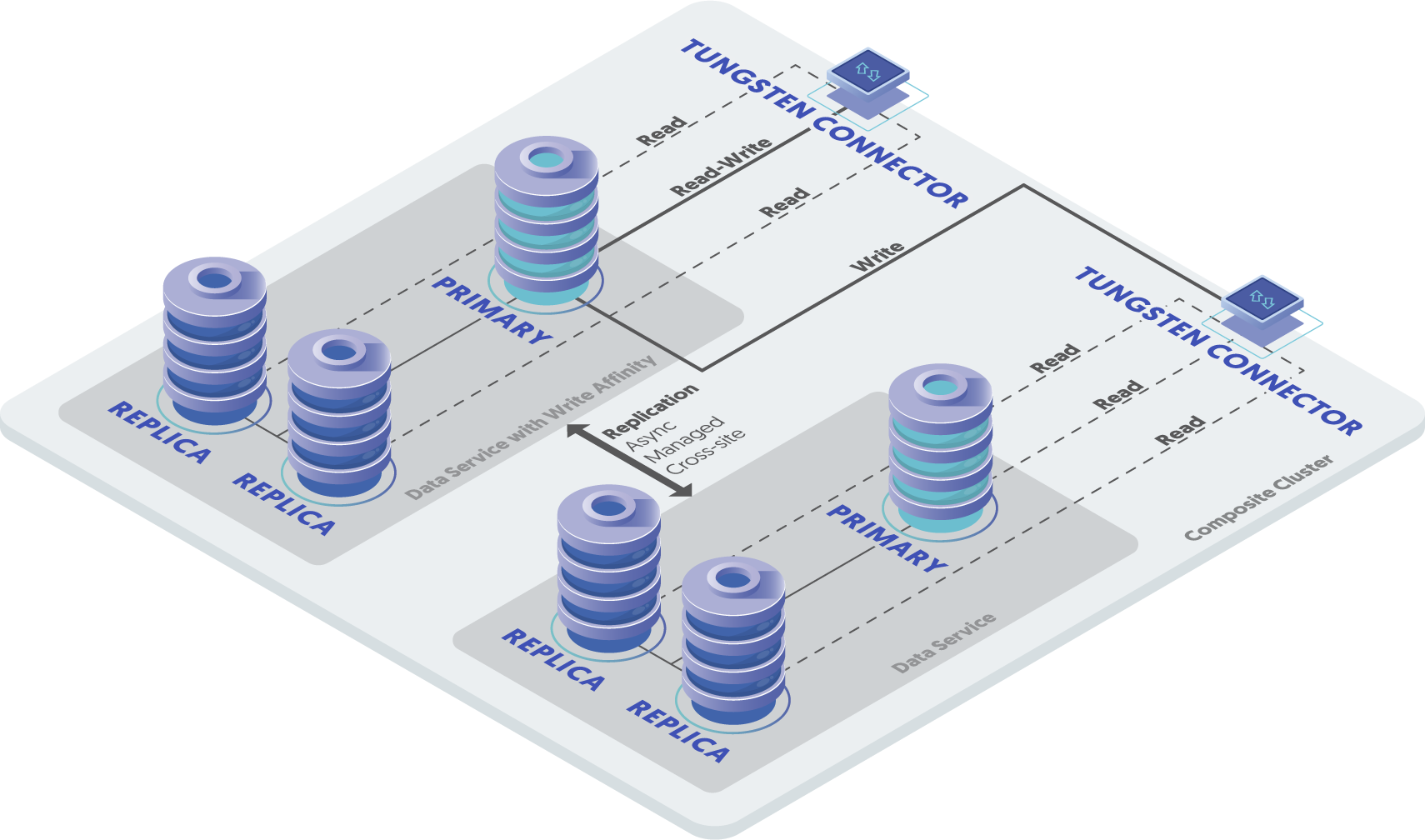
The benefit of a Composite Dynamic Active/Active cluster and being able to direct writes to only one cluster, avoids all the inherent risks of a true Active/Active deployment, such as conflicts when the same row is altered in both clusters.
This is especially useful for deployments that do not have the ability to avoid potential conflicts programmatically.
The additional benefit this topology offers is instant failover of writes in the event of a cluster failure. In Composite Dynamic Active/Active if the cluster with write affinity fails, writes instantly failover to the other cluster, and because that cluster is open for writes, applications will continue uninterrupted. This differs from a Composite Active/Passive where in the event of a cluster failure there needs to be a manual failover process to re-route write operations.
Enabling
To use Composite Dynamic Active/Active you need to have a Composite Active/Active cluster deployed, then it is simply a case of specifying the required affinity within the connectors.
For the purpose of this example we will assume we have two clusters alpha and beta. Each cluster will
have two connectors and it is desired that the alpha cluster be the primary write destination.
Within the configuration for the connectors, add the following:
=> On alpha nodes:
connector-write-affinity=alpha
connector-read-affinity=alpha

=> On beta nodes:
connector-write-affinity=alpha
connector-read-affinity=beta
This will have the effect of setting the write affinity to the alpha cluster primarily on both
alpha and beta clusters as follows:
alphacluster will get both read and write affinity toalphabetacluster will get write affinity toalpha, but maintain read affinity tobeta
After recovering a failed site
As outlined above, if the site that has write affinity fails, read-write traffic will failover to another site based on the affinity rules configured. Following recovery of the site that is configured as the primary write site, new connections will follow the write affinity rules, whereas existing connections will remain on the site that was promoted after failover.
To maintain data-integrity and to ensure writes continue to only be directed to a single site, it is therefore essential to also enable the
following tpm property:
connector-reset-when-affinity-back=true
With this enabled, following recovery of the primary write site, all connections (new and old) will revert to the original, intended, cluster configured with primary write affinity.
Testing DAA in Bridge Mode
When using Bridge mode (the default at install), all requests are routed to the Primary by default. To test query routing, run the following query when connected through the Connector:
mysql> select @@hostname;
In Bridge mode, the only way to verify that reads are being directed to replicas is to establish a read-only port and execute queries
through it to force the QoS RO_RELAXED.
First, ensure that your INI file has the following option, then run tpm update
connector-readonly-listen-port=3307
To test, ensure you connect to the specified read-only port:
shell> mysql -h... -P3307
mysql> select @@hostname;
Testing DAA in Proxy Mode with No R/W Splitting Enabled
To test Connector query routing in Proxy mode, you may use the URL-based R/W splitting to test query routing:
Route to the Primary:
shell> mysql -h... -Dtest@qos=RW_STRICT -e "select @@hostname;"

Route to a Replica:
shell> mysql -h... -Dtest@qos=RO_RELAXED -e "select @@hostname;"
Testing DAA in Proxy Mode with R/W Splitting Enabled (SmartScale or @direct)
To test Connector query routing in Proxy mode when either SmartScale or @direct read/write splitting has been enabled, you may use the following:
Route to the Primary:
mysql> select @@hostname for update;

Route to a Replica:
mysql> select @@hostname;
Manual Site-Level Switch
For DAA to work properly, all writes must go to one cluster or another, no exceptions. When you want to move all writes to another
site/cluster (like you would in a Composite Active/Passive cluster using the switch command at the composite level),
there is no switch command available in Dynamic Active/Active.
As of version 7.0.2, we strongly recommend that you use the datasource drain at the composite level to shun the
currently selected Active cluster. This will allow the Connector to finish (drain) all in-flight queries, shun
the composite dataservice once fully drained, and then move all writes to another cluster.
Please note that this is different than using the datasource shun (available prior to version 7.0.2) at the composite
level to shun the currently selected Active cluster. Using shun instead of drain will
force the Connector to immediately sever/terminate all in-flight queries, then move all writes to another cluster.
shell> cctrl -multi
Tungsten Clustering 8.0.4 Build 132
beta: session established, encryption=true, authentication=true
jgroups: encrypted, database: encrypted
[LOGICAL] / > use world
[LOGICAL] /world > datasource alpha drain 30

WARNING: This is an expert-level command:
Incorrect use may cause data corruption
or make the cluster unavailable.

Do you want to continue? (y/n)> y
composite data source 'alpha' is now SHUNNED
[LOGICAL] /world > exit
Exiting...
When you are ready to resume writes to the originally-configured site, use the composite-level cctrl command
datasource welcome. If you have set connector-reset-when-affinity-back to true, then writes will move back to the
original site. If set to false, the writes will stay where they are.
shell> cctrl -multi
Tungsten Clustering 8.0.4 Build 132
beta: session established, encryption=true, authentication=true
jgroups: encrypted, database: encrypted
[LOGICAL] / > use world
[LOGICAL] / > datasource alpha welcome

WARNING: This is an expert-level command:
Incorrect use may cause data corruption
or make the cluster unavailable.

Do you want to continue? (y/n)> y
composite data source 'alpha' is now ONLINE
[LOGICAL] /world > exit
Exiting...