Deploying a Composite Active/Active (CAA) Cluster
A Composite Active/Active (CAA) Cluster topology provides all the benefits of a typical dataservice at a single location, but with the benefit of also replicating the information to another site. The underlying configuration within Tungsten Cluster uses two services within each node; one provides the replication within the cluster, and the second provides replication from the remote cluster. Both are managed by the Tungsten Manager
Composite Active/Active Clusters were previously referred to as Multi-Site/Active-Active (MSAA) clusters. The name has been updated to reflect the nature of these clusters as part of an overall active/active deployment using clusters, where the individual clusters could be in the same or different locations.
Whilst the older Multi-Site/Active-Active topology is still valid and supported, it is recommended that this newer Composite Active/Active topology is adopted from version 6 onwards. For details on the older topology, see "Deploying a Multi-Site Active/Active (MSAA) Cluster".
The configuration is handled with a single configuration and deployment that configures the core cluster services and additional cross-cluster services.
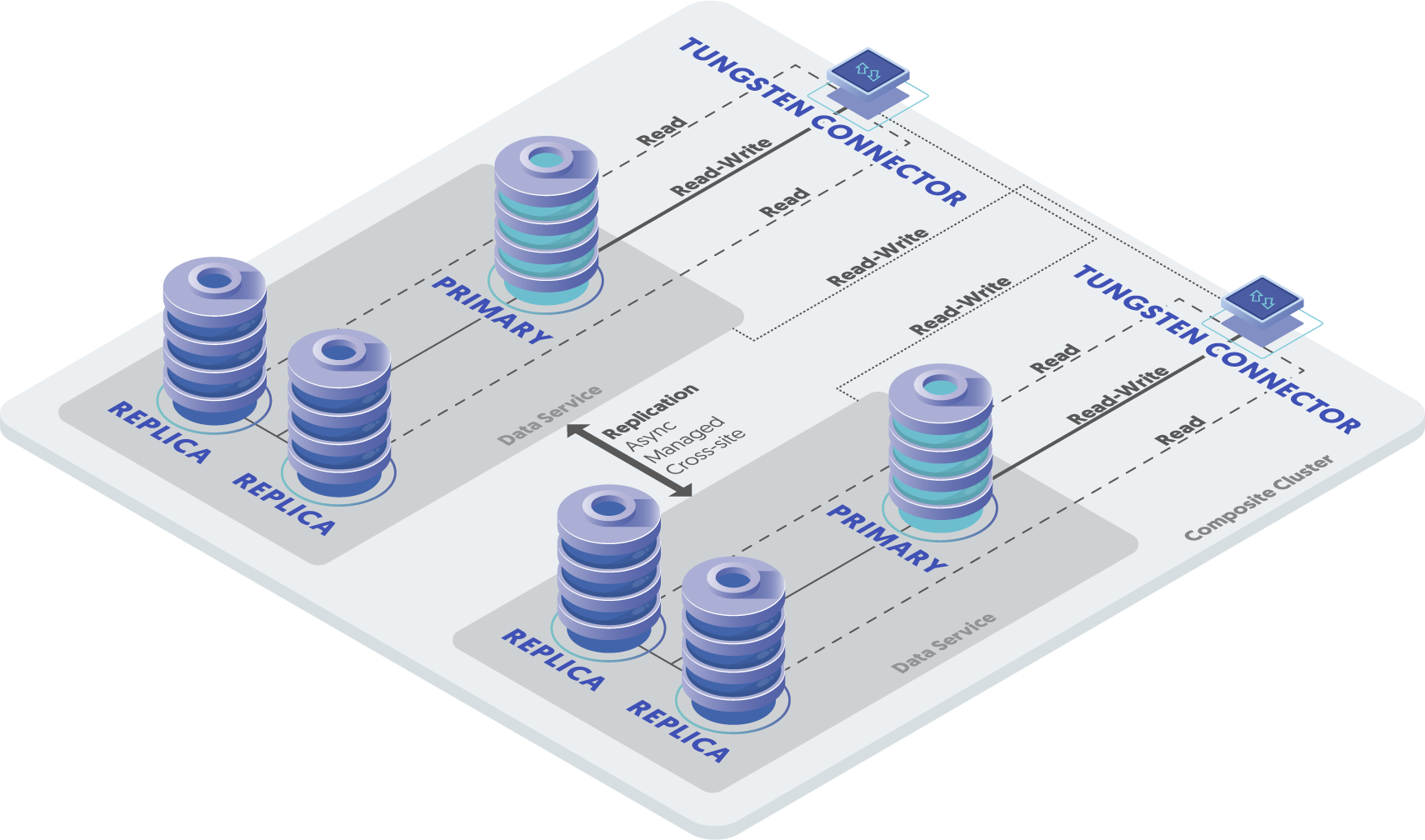
The service can be described as follows:
Tungsten Cluster Service:
eastReplicates data between
east1,east2andeast3.Tungsten Cluster Service:
westReplicates data between
west1,west2andwest3.Tungsten Cluster Service:
west_from_eastDefines the replication service using a secondary sub-service within the cluster. This service reads THL FROM
eastand writes to therelaynode inwest, subsequently, thereplicanodes withinwestare then replicated to from there.Tungsten Cluster Service:
east_from_westDefines the replication service using a secondary sub-service within the cluster. This service reads THL FROM
westand writes to therelaynode ineast, subsequently, thereplicanodes withineastare then replicated to from there.
Available in 7.0.0 and later.
A new Composite Dynamic Active/Active topology was introduced from version 7.0.0 of Tungsten Cluster
Composite Dynamic Active/Active builds on the foundation of the Composite Active/Active topology and the cluster continues to operate and be configured in the same way.
The difference is, with Composite Dynamic Active/Active, the cluster instructs the Proxy layer to behave like a {dap_name} cluster.
For more information on this topology and how to enable it, see "Deploying a Dynamic Active/Active (DAA) Cluster"
Prepare
Some considerations must be taken into account for any active/active scenarios:
- For tables that use auto-increment, collisions are possible if two hosts select the same auto-increment number. You can reduce the
effects by configuring each MySQL host with a different auto-increment settings, changing the offset and the increment values.
For example, adding the following lines to your
my.cnffile:In this way, the increments can be staggered on each machine and collisions are unlikely to occur.auto-increment-offset = 1auto-increment-increment = 4 - Use row-based replication. Update your configuration file to explicitly use row-based replication by adding the following to your
my.cnffile:binlog-format = row - Beware of triggers. Triggers can cause problems during replication because if they are applied on the replica as well as the primary you can get data corruption and invalid data. Tungsten Cluster cannot prevent triggers from executing on a replica, and in an active/active topology there is no sensible way to disable triggers. Instead, check at the trigger level whether you are executing on a primary or replica. For more information, see "Triggers".
Install
Deployment of Composite Active/Active clusters is only supported using the INI method of deployment.
Configuration and deployment of the cluster works as follows:
- Creates two basic primary/replica clusters.
- Creates a composite service that includes the primary/replica clusters within the definition.
The resulting configuration within the example builds the following deployment:
- One cluster,
east, with three hosts. - One cluster,
west, with three hosts. - All six hosts in the two clusters will have a manager, replicator and connector installed.
- Each replicator has two replication services, one service that replicates the data within the cluster. The second service, replicates data from the other cluster to this host.
Creating the full topology requires a single install step, this creates the Tungsten Cluster dataservices, and creates the Composite dataservices on different network ports to allow for the cross-cluster replication to operate.
Create the combined configuration file
/etc/tungsten/tungsten.inion all cluster hosts:Example tungsten.ini[defaults]user=tungsteninstall-directory=/opt/continuentprofile-script=~/.bash_profilereplication-user=tungstenreplication-password=secretreplication-port=13306application-user=app_userapplication-password=secretapplication-port=3306rest-api-admin-user=apiuserrest-api-admin-password=secretconnector-rest-api-address=0.0.0.0manager-rest-api-address=0.0.0.0replicator-rest-api-address=0.0.0.0[east]topology=clusteredmaster=east1members=east1,east2,east3connectors=east1,east2,east3[west]topology=clusteredmaster=west1members=west1,west2,west3connectors=west1,west2,west3[global]topology=composite-multi-mastercomposite-datasources=east,westShow argument definitions
user=tungstenOS System User, for example tungsten. DO NOT use root.install-directory=/opt/continuentInstallation directory.profile-script=~/.bash_profileAppend commands to include env.sh in this profile script.replication-user=tungstenUser for database connection.replication-password=secretDatabase password.replication-port=13306Database network port.application-user=app_userDatabase username for the connector.application-password=secretDatabase password for the connector.application-port=3306Port for the connector to listen on.rest-api-admin-user=apiuserSpecify the initial Admin Username for API access.Available from v7.0.0rest-api-admin-password=secretSpecify the initial Admin User Password for API access.rest-api-admin-passwordalias only available from version 7.1.2 onwards.Available from v7.0.0connector-rest-api-address=0.0.0.0Address for the API to bind too.Available from v7.0.0manager-rest-api-address=0.0.0.0Address for the API to bind too.Available from v7.0.0replicator-rest-api-address=0.0.0.0Address for the API to bind too.Available from v7.0.0The configuration above defines two clusters,
eastandwest, which are both part of a composite cluster service,global.From v7.0.0If you plan to make full use of the REST API (which is enabled by default) you will need to also configure a username and password for API Access. This must be done by specifying the following options in your configuration:
rest-api-admin-user=tungstenrest-api-admin-pass=secretFrom v7.2.0 the alias
rest-api-admin-passwordcan also be used.WarningService names should not contain the keyword
fromwithin a Composite Active/Active deployment. This keyword is used (with the underscore separator, for example,east_from_westto denote cross-site replicators within the cluster. To avoid confusion, avoid usingfromso that it is easy to distinguish between replication pipelines.When configuring this service,
tpmwill automatically imply the following into the configuration:A parent composite service,
globalin this example, with child services as listed,eastandwest.Replication services between each child service, using the service name
a_from_b, for example,east_from_westandwest_from_east.More child services will create more automatic replication services. For example, with three clusters,
alpha,beta, andgamma,tpmwould configurealpha_from_betaandalpha_from_gammaon the alpha cluster,beta_from_alphaandbeta_from_gammaon the beta cluster, and so on.For each additional service, the port number is automatically configured from the base port number for the first service. For example, using the default port 2112, the
east_from_westservice would have THL port 2113.
Execute the installation on each host within the entire composite cluster. For example, on all six hosts provided in the sample configuration above.
Install the Tungsten Cluster RPM package or download the compressed tarball and unpack it:
shell> cd /opt/continuent/softwareshell> tar zxf tungsten-clustering-8.0.4-132.tar.gzChange to the Tungsten Cluster staging directory:
shell> cd tungsten-clustering-8.0.4-132Run
tpmto install the software:shell > ./tools/tpm installDuring the installation and startup,
tpmwill notify you of any problems that need to be fixed before the service can be correctly installed and started. If the service starts correctly, you should see the configuration and current status of the service.If you included the
start-and-reportoption in your configuration, the software will be started for you. If you excluded this option then you will need to manually start the software by continuing with the steps below.
Initialize your
PATHand environment:shell> source /opt/continuent/share/env.shStart the software, if not already running:
shell> startall
The Composite Active/Active clustering should be installed and ready to use.
Best Practices
In addition to this information, follow the guidelines in "Best Practices"
- Running a Composite Active/Active service uses many different components to keep data updated on all servers. Monitoring the dataservice is divided into monitoring the two different clusters and each cluster sub-service cluster responsible for replication to/from remote clusters.
- Configure your database servers with distinct auto-increment-increment and auto-increment-offset settings. Each location that may accept writes should have a unique offset value.
Using cctrl gives you the dataservice status. By default, cctrl will connect you to the custer associated with the node
that you issue the command from. To start at the top level, issue cctrl -multi, or issue cd / when
connected instead.
At the top level, the composite cluster output shows the composite service, composite cluster members and replication services:
Tungsten Clustering 8.0.4 Build 132
east: session established, encryption=false, authentication=false
jgroups: unencrypted, database: unencrypted
[LOGICAL] / > ls
global
east
  east_from_west
west
  west_from_east
To examine the overall composite cluster status, change to the composite cluster and use ls:
[LOGICAL] / > use global
[LOGICAL] /global > ls

COORDINATOR[east1:AUTOMATIC:ONLINE]
 east:COORDINATOR[east1:AUTOMATIC:ONLINE]
 west:COORDINATOR[west2:AUTOMATIC:ONLINE]

ROUTERS:
+---------------------------------------------------------------------------------+
|connector@east1[8925](ONLINE, created=0, active=0)                               |
|connector@east2[8770](ONLINE, created=0, active=0)                               |
|connector@east3[8801](ONLINE, created=0, active=0)                               |
|connector@west1[8801](ONLINE, created=0, active=0)                               |
|connector@west2[8770](ONLINE, created=0, active=0)                               |
|connector@west3[8768](ONLINE, created=0, active=0)                               |
+---------------------------------------------------------------------------------+

DATASOURCES:
+---------------------------------------------------------------------------------+
|east(composite master:ONLINE, global progress=12, max latency=0.995)             |
|STATUS [OK] [2025/01/07 11:30:23 AM UTC]                                         |
+---------------------------------------------------------------------------------+
|  east(master:ONLINE, progress=10, max latency=0.229)                            |
|  east_from_west(relay:ONLINE, progress=2, max latency=0.995)                    |
+---------------------------------------------------------------------------------+
+---------------------------------------------------------------------------------+
|west(composite master:ONLINE, global progress=12, max latency=0.988)             |
|STATUS [OK] [2025/01/07 11:30:27 AM UTC]                                         |
+---------------------------------------------------------------------------------+
|  west(master:ONLINE, progress=2, max latency=0.988)                             |
|  west_from_east(relay:ONLINE, progress=10, max latency=0.260)                   |
+---------------------------------------------------------------------------------+
For each cluster within the composite cluster, four lines of information are provided:
- |east(composite master:ONLINE, global progress=12, max latency=0.995) |
This line indicates:
- The name and type of the composite cluster, and whether the primary in the cluster is online.
- The global progress. This is a counter that combines the local progress of the cluster, and the replication of data from this
cluster to the remote clusters in the composite to this cluster. For example, if data is inserted into
west - The maximum latency within the cluster.
- |STATUS [OK] [2025/01/07 11:30:23 AM UTC] |
The status and date within the primary of the cluster.
- | east(master:ONLINE, progress=10, max latency=0.229) |
The status and progress of the cluster.
- | east_from_west(relay:ONLINE, progress=2, max latency=0.995) |
The status and progress of remote replication from the cluster.
The global progress and the progress work together to provide an indication of the overall replication status
within the composite cluster:
- Inserting data into the primary on
eastwill:- Increment the
progress within theeastcluster. - Increment the
global progress within theeastcluster.
- Increment the
- Inserting data into the primary on
westwill:- Increment the
progress within thewestcluster. - Increment the
global progress within thewestcluster.
- Increment the
Looking at the individual cluster shows only the cluster status, not the cross-cluster status:
[LOGICAL] /global > use east
[LOGICAL] /east > ls
COORDINATOR[east1:AUTOMATIC:ONLINE]

ROUTERS:
+---------------------------------------------------------------------------------+
|connector@east1[8925](ONLINE, created=0, active=0)                               |
|connector@east2[8770](ONLINE, created=0, active=0)                               |
|connector@east3[8801](ONLINE, created=0, active=0)                               |
|connector@west1[8801](ONLINE, created=0, active=0)                               |
|connector@west2[8770](ONLINE, created=0, active=0)                               |
|connector@west3[8768](ONLINE, created=0, active=0)                               |
+---------------------------------------------------------------------------------+

DATASOURCES:
+---------------------------------------------------------------------------------+
|east1(master:ONLINE, progress=10, THL latency=0.134)                             |
|STATUS [OK] [2025/01/07 01:19:12 PM UTC]                                         |
+---------------------------------------------------------------------------------+
|  MANAGER(state=ONLINE)                                                          |
|  REPLICATOR(role=master, state=ONLINE)                                          |
|  DATASERVER(state=ONLINE)                                                       |
|  CONNECTIONS(created=0, active=0)                                               |
+---------------------------------------------------------------------------------+
+---------------------------------------------------------------------------------+
|east2(slave:ONLINE, progress=10, latency=0.229)                                  |
|STATUS [OK] [2025/01/07 11:30:26 AM UTC]                                         |
+---------------------------------------------------------------------------------+
|  MANAGER(state=ONLINE)                                                          |
|  REPLICATOR(role=slave, master=east1, state=ONLINE)                             |
|  DATASERVER(state=ONLINE)                                                       |
|  CONNECTIONS(created=0, active=0)                                               |
+---------------------------------------------------------------------------------+
+---------------------------------------------------------------------------------+
|east3(slave:ONLINE, progress=10, latency=0.159)                                  |
|STATUS [OK] [2025/01/07 01:19:18 PM UTC]                                         |
+---------------------------------------------------------------------------------+
|  MANAGER(state=ONLINE)                                                          |
|  REPLICATOR(role=slave, master=east1, state=ONLINE)                             |
|  DATASERVER(state=ONLINE)                                                       |
|  CONNECTIONS(created=0, active=0)                                               |
+---------------------------------------------------------------------------------+
Within each cluster, cctrl can be used to monitor the current status. For more information on checking the status and
controlling operations, see "Checking Dataservice Status".
To monitor all services and the current status, you can also use the multi_trepctl command. This generates a unified status
report for all the hosts and services configured:
shell> multi_trepctl --by-service
| host  | servicename    | role   | state  | appliedlastseqno | appliedlatency |
| east1 | east           | master | ONLINE |                5 |          0.440 |
| east2 | east           | slave  | ONLINE |                5 |          0.538 |
| east3 | east           | slave  | ONLINE |                5 |          0.517 |
| east1 | east_from_west | relay  | ONLINE |               23 |          0.074 |
| east2 | east_from_west | slave  | ONLINE |               23 |          0.131 |
| east3 | east_from_west | slave  | ONLINE |               23 |          0.111 |
| west1 | west           | master | ONLINE |               23 |          0.021 |
| west2 | west           | slave  | ONLINE |               23 |          0.059 |
| west3 | west           | slave  | ONLINE |               23 |          0.089 |
| west1 | west_from_east | relay  | ONLINE |                5 |          0.583 |
| west2 | west_from_east | slave  | ONLINE |                5 |          0.562 |
| west3 | west_from_east | slave  | ONLINE |                5 |          0.592 |
In the above example, it can be seen that the west services have a higher applied last sequence number than the
east services, this is because all the writes have been applied within the west cluster.
For the multi_trepctl command to work, you will need to have enabled passwordless ssh between all nodes within the cluster.
To monitor individual servers and/or services, use trepctl, using the correct servicename. For example, on east1 to
check the status of the replicator within the Tungsten Cluster service, use the trepctl services command to get the
status of both the local and cross-cluster services:
shell> trepctl service
Processing services command...
NAME              VALUE
----              -----
appliedLastSeqno: 10
appliedLatency  : 0.134
role            : master
serviceName     : east
serviceType     : local
started         : true
state           : ONLINE
NAME              VALUE
----              -----
appliedLastSeqno: 2
appliedLatency  : 0.987
role            : relay
serviceName     : east_from_west
serviceType     : local
started         : true
state           : ONLINE
Finished services command...
To get a more detailed status, you must explicitly specify the service:
shell> trepctl -service east_from_west status
Resetting a single dataservice
Under certain conditions, dataservices in an active/active configuration may drift and/or become inconsistent with the data in another dataservice. If this occurs, you may need to re-provision the data on one or more of the dataservices after first determining the definitive source of the information.
In the following example the west service has been determined to be the definitive copy of the data. To fix the issue, all
the datasources in the east service will be reprovisioned from one of the datasources in the west service.
The following is a guide to the steps that should be followed. In the example procedure it is the east service
that has failed:
Put the dataservice into MAINTENANCE mode. This ensures that Tungsten Cluster will not attempt to automatically recover the service.
cctrl [east]> set policy maintenanceOn the
east, failed, Tungsten Cluster service, put each Tungsten Connector offline:cctrl [east]> router * offlineReset the local failed service on all servers connected to the remote failed service. For example, on
west3reset thewest_from_eastservice:shell west> trepctl -service west_from_east offlineshell west> trepctl -service west_from_east reset -all -yReset the local service on each server within the failed region (
east3):shell east> trepctl -service east offlineshell east> trepctl -service east reset -all -yRestore a backup on each host (
east3) in the failedeastservice from a host in thewestservice, first on the host that will be the Primary node within the east cluster, for exampleeast1:[object Object]When complete, proceed to restore the remaining hosts within
eastusing the newly restoredeast1as the source:shell east> tprovision -s east1 -m xtrabackupNoteFor a full explanation of using
tprovisionsee "The tprovision Command"Place all the services on
west3back online:shell west> trepctl -service west_from_east onlineOn the
east, failed, Tungsten Cluster service, put each Tungsten Connector online:cctrl [east]> router * onlineSet the policy back to AUTOMATIC:
cctrl> set policy automatic
Resetting all dataservices
To reset all of the dataservices:
On all hosts (e.g.
east3andwest3):Place both clusters into MAINTENANCE mode:
shell> cctrl[LOGICAL] /east > use global[LOGICAL] /global > set policy maintenanceOn all nodes in both clusters:
shell> trepctl -all-services offlineshell> trepctl -all-services reset -all -yshell> trepctl -all-services onlineReturn both clusters to AUTOMATIC mode:
shell> cctrl[LOGICAL] /east > use global[LOGICAL] /global > set policy maintenance
Dataserver maintenance
Fixing Replication Errors
In the event of a replication fault, the standard cctrl, trepctl and other utility commands
in "Command-line tools" can be used to bring the dataservice back into operation. All the tools are safe to use.
If you have to perform any updates or modifications to the stored MySQL data, ensure binary logging has been disabled using:
mysql> SET SESSION SQL_LOG_BIN=0;
before running any commands, this prevents statements and operations reaching the binary log so that the operations will not be replicated to other hosts.
Recovering Cross Site Services
In a Composite Active/Active topology, a switch or a failover not only promotes a replica to be a new primary, but also will require
the ability to reconfigure cross-site communications. This process therefore assumes that cross-site communication is online and working.
In some situations, it may be possible that cross-site communication is down, or for some reason cross-site replication is in an
OFFLINE:ERROR state - for example a DDL or DML statement that worked in the local cluster may have failed to apply in the
remote cluster.
If a switch or failover occurs and the process is unable to reconfigure the cross-site replicators, the local switch will still
succeed, however the associated cross-site services will be placed into a SHUNNED(SUBSERVICE-SWITCH-FAILED) state.
The guide explains how to recover from this situation.
- The examples are based on a 2-cluster topology, named
NYCandLONDONand the composite dataservice namedGLOBAL. - The cluster is configured with the following dataservers:
-
NYC : db1 (primary), db2 (replica), db3 (replica) -
LONDON: db4 (primary), db5 (replica), db6 (replica)
-
- The cross site replicators in both clusters are in an
OFFLINE:ERRORstate due to failing DDL. - A switch was then issued, promoting db3 as the new primary in NYC and db5 as the new primary in
LONDON
When the cluster enters a state where the cross-site services are in an error, output from cctrl will look like the
following:
shell> cctrl -expert -multi
[LOGICAL:EXPERT] / > use london_from_nyc
london_from_nyc: session established, encryption=false, authentication=false
[LOGICAL:EXPERT] /london_from_nyc > ls
COORDINATOR[db6:AUTOMATIC:ONLINE]

ROUTERS:
+---------------------------------------------------------------------------------+
|connector@db1[26248](ONLINE, created=0, active=0)                                |
|connector@db2[14906](ONLINE, created=0, active=0)                                |
|connector@db3[15035](ONLINE, created=0, active=0)                                |
|connector@db4[27813](ONLINE, created=0, active=0)                                |
|connector@db5[4379](ONLINE, created=0, active=0)                                 |
|connector@db6[2098](ONLINE, created=0, active=0)                                 |
+---------------------------------------------------------------------------------+

DATASOURCES:
+---------------------------------------------------------------------------------+
|db5(relay:SHUNNED(SUBSERVICE-SWITCH-FAILED), progress=6, latency=0.219)          |
|STATUS [SHUNNED] [2025/01/07 10:27:24 AM UTC]                                    |
+---------------------------------------------------------------------------------+
|  MANAGER(state=ONLINE)                                                          |
|  REPLICATOR(role=relay, master=db3, state=ONLINE)                               |
|  DATASERVER(state=ONLINE)                                                       |
|  CONNECTIONS(created=0, active=0)                                               |
+---------------------------------------------------------------------------------+
+---------------------------------------------------------------------------------+
|db4(slave:SHUNNED(SUBSERVICE-SWITCH-FAILED), progress=6, latency=0.252)          |
|STATUS [SHUNNED] [2025/01/07 10:27:25 AM UTC]                                    |
+---------------------------------------------------------------------------------+
|  MANAGER(state=ONLINE)                                                          |
|  REPLICATOR(role=slave, master=db5, state=ONLINE)                               |
|  DATASERVER(state=ONLINE)                                                       |
|  CONNECTIONS(created=0, active=0)                                               |
+---------------------------------------------------------------------------------+
+---------------------------------------------------------------------------------+
|db6(slave:SHUNNED(SUBSERVICE-SWITCH-FAILED), progress=6, latency=0.279)          |
|STATUS [SHUNNED] [2025/01/07 10:27:25 AM UTC]                                    |
+---------------------------------------------------------------------------------+
|  MANAGER(state=ONLINE)                                                          |
|  REPLICATOR(role=slave, master=db4, state=ONLINE)                               |
|  DATASERVER(state=ONLINE)                                                       |
|  CONNECTIONS(created=0, active=0)                                               |
+---------------------------------------------------------------------------------+
In the above example, you can see that all services are in the SHUNNED(SUBSERVICE-SWITCH-FAILED) state, and partial
reconfiguration has happened.
The Replicators for db4 and db6 should be replicas of db5, db5 has correctly configured to the new primary in nyc, db3. The actual state of the cluster in each scenario maybe different depending upon the cause of the loss of cross-site communication. Using the steps below, apply the necessary actions that relate to your own cluster state, if in any doubt always contact Continuent Support for assistance.
The first step is to ensure the initial replication errors have been resolved and that the replicators are in an online state, the steps to resolve the replicators will depend on the reason for the error, for further guidance on resolving these issues, see "operations".
From one node, connect into cctrl at the expert level:
shell> cctrl -expert -multiNext, connect to the cross-site subservice, in this example, london_from_nyc
cctrl> use london_from_nycNext, place the service into MAINTENANCE Mode
cctrl> set policy maintenanceEnable override of commands issued
cctrl> set force trueBring the relay datasource online
cctrl> datasource db5 onlineIf you need to change the source for the relay replicator to the correct, new, primary in the remote cluster, take the replicator offline. If the relay source is correct, then move on to step 10.
cctrl> replicator db5 offlineChange the source of the relay replicator
cctrl> replicator db5 relay nyc/db3Bring the replicator online
cctrl> replicator db5 onlineFor each datasource that requires the replicator altering, issue the following commands:
cctrl> replicator datasource offlinecctrl> replicator datasource slave db5cctrl> replicator datasource onlineFor example:
cctrl> replicator db4 offlinecctrl> replicator db4 slave db5cctrl> replicator db4 onlineOnce all replicators are using the correct source, we can then bring the cluster back
cctrl> cluster welcomeSome of the datasources may still be in the SHUNNED state, so for each of those, you can then issue the following
cctrl> datasource datasource onlineFor example:
cctrl> datasource db4 onlineOnce all nodes are online, we can then return the cluster to AUTOMATIC
cctrl> set policy automaticRepeat this process for the other cross-site subservice if required
Adding a Cluster to an existing installation
This procedure explains how to add additional clusters to an existing Composite Active/Active configuration.
The example in this procedure adds a new 3-node cluster consisting of nodes db7, db8 and
db9 within a service called tokyo. The existing cluster contains two dataservices, nyc and
london, made up of nodes db1, db2, db3 and db4,
db5, db6 respectively.
Prerequisites
Ensure the new nodes have all the necessary prerequisites in place, specifically paying attention to the following:
- MySQL auto_increment parameters set appropriately on existing and new clusters.
- All new nodes have full connectivity to the existing nodes and the hosts file contains correct hostnames.
- All existing nodes have full connectivity to the new nodes and hosts file contains correct hostnames.
Backup and Restore
We need to provision all the new nodes in the new cluster with a backup taken from one node in any of the existing clusters. In this example we
are using db6 in the london dataservice as the source for the backup.
Shun and stop the services on the node used for the backup
db6-shell> cctrlcctrl> datasource db6 shuncctrl> replicator db6 offlinecctrl> exitdb6-shell> stopalldb6-shell> sudo service mysqld stopNext, use whichever method you wish to copy the mysql datafiles from
db6to all the nodes in the new cluster (scp, rsync, xtrabackup etc).vvEnsure ALL database files are copied and reside in the same path locations as the source.Once backup copied across, restart the services on
db6db6-shell> sudo service mysqld startdb6-shell> startalldb6-shell> cctrlcctrl> datasource db6 recovercctrl> exitEnsure all files copied to the target nodes have the correct file ownership.
Start mysql on the new nodes
Update Existing Configuration
Next we need to change the configuration on the existing hosts to include the configuration of the new cluster.
You need to add a new service block that includes the new nodes and append the new service to the composite-datasources parameter
in the composite dataservice, all within /etc/tungsten/tungsten.ini
Example of a new service block and composite-datasources change added to existing hosts configuration:
[tokyo]
topology=clustered
master=db7
members=db7,db8,db9
connectors=db7,db8,db9

[global]
topology=composite-multi-master
composite-datasources=nyc,london,tokyo
Show argument definitions
topology=composite-multi-masterReplication topology for the dataservice.master=db7Hostname of the primary (or relay) host within this service.members=db7,db8,db9Hostnames for the dataservice members.connectors=db7,db8,db9Hostnames for the dataservice connectors.New Host Configuration
To avoid any differences in configuration, once the changes have been made to the tungsten.ini on the existing hosts, copy
this file from one of the nodes to all the nodes in the new cluster.
Ensure start-and-report is false or not set in the config.
Install on new nodes
On the 3 new nodes, validate the software:
shell> cd /opt/continuent/software/tungsten-clustering-8.0.4-132
shell> tools/tpm validate
This may produce Warnings that the tracking schemas for the existing cluster already exist - this is OK and they can be ignored. Assuming no other unexpected errors are reported, then go ahead and install the software:
shell> tools/tpm install
After installation is complete, if you have security enabled you must now copy all the related security file from
one of the existing hosts /opt/continuent/share directory to ALL of the new hosts before starting the software.
For more information on security, see "security-link-here"
Update existing nodes
Before we start the new cluster, we now need to update the existing clusters
Put entire cluster into MAINTENANCE
shell> cctrlcctrl> use {composite-dataservice}cctrl> set policy maintenancecctrl> lsCOORDINATOR[db3:MAINTENANCE:ONLINE]london:COORDINATOR[db4:MAINTENANCE:ONLINE]nyc:COORDINATOR[db3:MAINTENANCE:ONLINE]cctrl> exitUpdate the software on each node. This needs to be executed from the software staging directory using the
--replace-releaseoption as this will ensure the new cross-site dataservices are setup correctly. Update the primaries first followed by the replicas, cluster by cluster:shell> cd /opt/continuent/software/tungsten-clustering-8.0.4-132shell> tools/tpm update --replace-release
Start the new cluster
On all the nodes in the new cluster, start the software:
shell> startall
Validate and check
Using cctrl, check that the new cluster appears and that all services are correctly showing online, it may take a few moments for the cluster to settle down and start everything.
shell> cctrl
cctrl> use {composite-dataservice}
cctrl> ls
cctrl> exit
Check the output of trepctl and ensure all replicators are online and new cross-site services appear in the pre-existing clusters.
shell> trepctl -service {service} status
shell> trepctl services
Place entire cluster back into
shell> cctrl
cctrl> use {composite-dataservice}
cctrl> set policy automatic
cctrl> ls
COORDINATOR[db2:AUTOMATIC:ONLINE]
 london:COORDINATOR[db5:AUTOMATIC:ONLINE]
 nyc:COORDINATOR[db2:AUTOMATIC:ONLINE]
 tokyo:COORDINATOR[db8:AUTOMATIC:ONLINE]
cctrl> exit
Most common failure scenarios
This is a complicated procedure but if followed carefully and ensuring all the prerequisites are in place, it should be smooth, however occasionally issues do occur, the following are the most common failures seen in the field:
- New cluster not showing in
cctrl- The most common reason for this is usually network. Ensure all the network ports are open and correct between nodes.
- Another common cause is that the replicators are not running, check all replicators for errors.
- Replicators in an error state.
- Most commonly happens when the backups is not consistent, ensure your backup process is clean and always restore the nodes from a host that is idle and not receiving updates from the cluster.
- New cluster software does not start.
- Are you running a secure installation? If so, ensure you have copied ALL of the security files from an existing host to all of the new hosts BEFORE starting the software.